
As a business owner, a thoughtful pricing strategy is one of the highest‑leverage decisions you’ll make. Done well, a price increase protects quality, funds better services, and keeps students and customers engaged for the long term. This guide gives you a clear plan, copy‑ready scripts, and step‑by‑step Baluu instructions—so you can implement a fair change without drama.
Why a price increase can strengthen your business
A price update isn’t just about money. It’s about the value people receive in every class and course—from safer equipment to better support. When you communicate early and explain why, your audience understands what’s happening and how it helps.
What a price rise can fund
- Upgraded equipment and materials to raise safety and quality.
- More time slots so learners have easier access to popular classes.
- Hire and train staff to maintain service levels in peak periods.
- Longer studio space hours so parents and students can register conveniently.
- Improved online tools that keep a course useful between sessions.
Decide your plan and the change date
Before you change prices, decide on a simple approach that fits your market and audience. Ideally, announce in advance and include a clear notice that summarises what changes, when it’s happening, and why. Keep it plain and refer readers to a short FAQ.
Two practical timelines
Pick the option that fits your calendar; both aim to maintain momentum while giving people time to plan.
Standard (45–60 days)
- Week 1: Soft heads‑up in class; banner on listings.
- Week 2: Email announcement; link to FAQ.
- Week 4: Lock‑in offer (packs/memberships) at current prices.
- Week 6: Final reminder; emphasise value and quality improvements.
- Go‑live: Prices update automatically in Baluu.
Sprint (21–30 days)
- Day 1: Official announcement.
- Day 7: Reminder + lock‑in option at current prices.
- Day 21: Final reminder; benefits recap for students.
- Go‑live: Update prices and confirm in your channels.
One thing to remember: talk to your team so everyone can answer questions consistently and refer people to the same FAQ.
Messaging that keeps your audience on side
Your audience wants clarity: what’s changing, why, and when. Use these as starting points and adapt to your tone.
Email announcement (copy/paste)

Subject: A small price increase to keep raising quality—thanks for your support
Hi {{first name}},
To maintain great classes and invest in better materials and support, we’re making a small price increase on selected classes and courses.
- What’s changing: current prices move to new prices across selected options.
- Why now: inflation and supplier costs, plus our plan to put money into facilities and coaching.
- How it helps: better equipment, more time slots, and resources that improve your experience.
Prefer the current prices? You can buy a pack or bundle before the change. Questions about tuition or fees? The FAQ below should answer most—otherwise contact us.
Thank you,
{{your name}} — {{studio}}
Short SMS/WhatsApp
Heads up from {{studio}}: a small price increase is coming to selected options to raise quality and maintain services. Check your email to lock in current prices or ask questions.
In‑class talking points
- “We’re adjusting prices to reflect cost changes and raise standards.”
- “Our emphasis is value: better materials, more convenient times, improved support.”
- “If you’re wondering about tuition or how to pay/register, please refer to the handout or ask at the desk.”
Using Baluu to automate the change
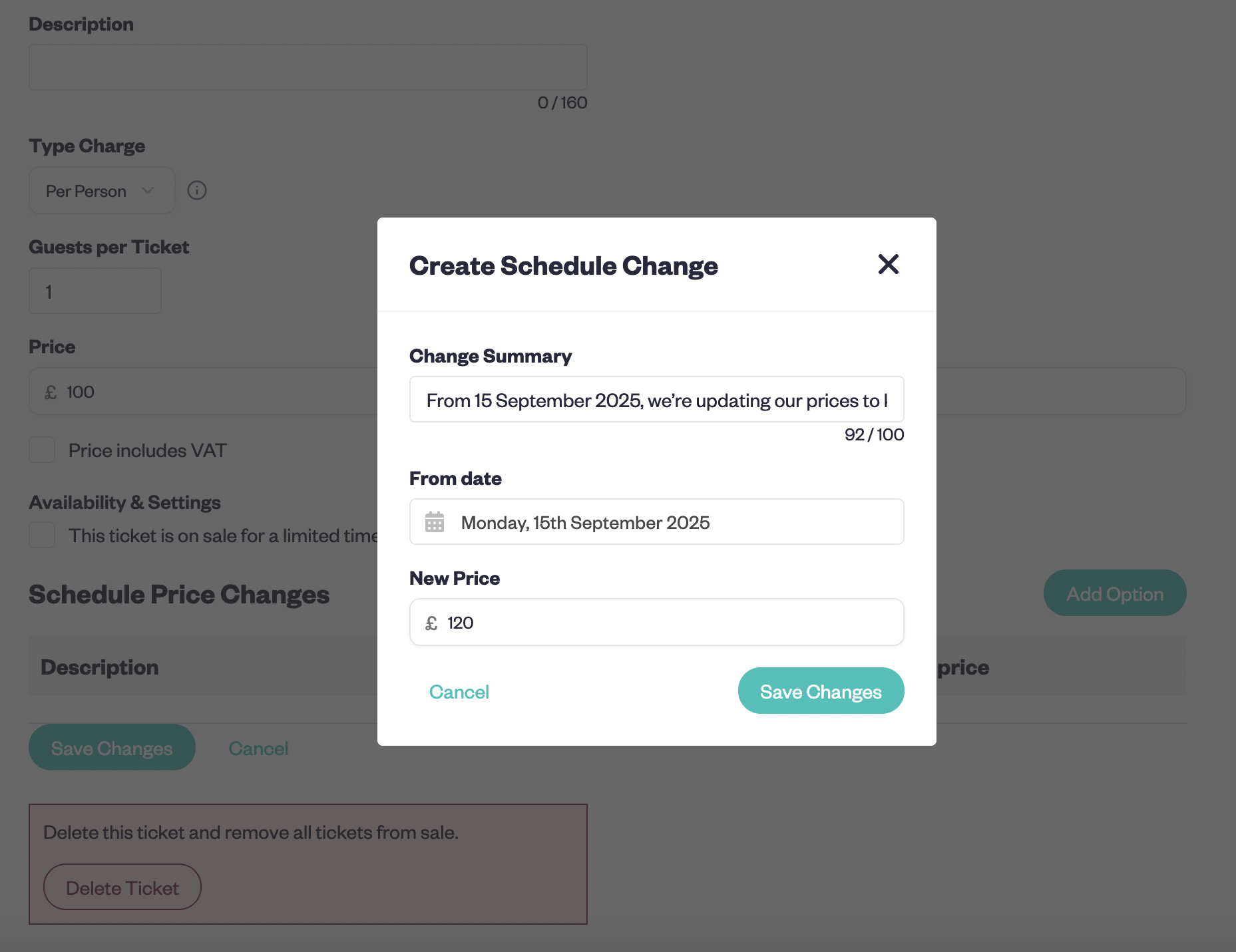
Baluu lets you schedule price changes so the switch happens on the exact date you choose—and it applies to the right class or course without manual edits.
How scheduled price changes apply
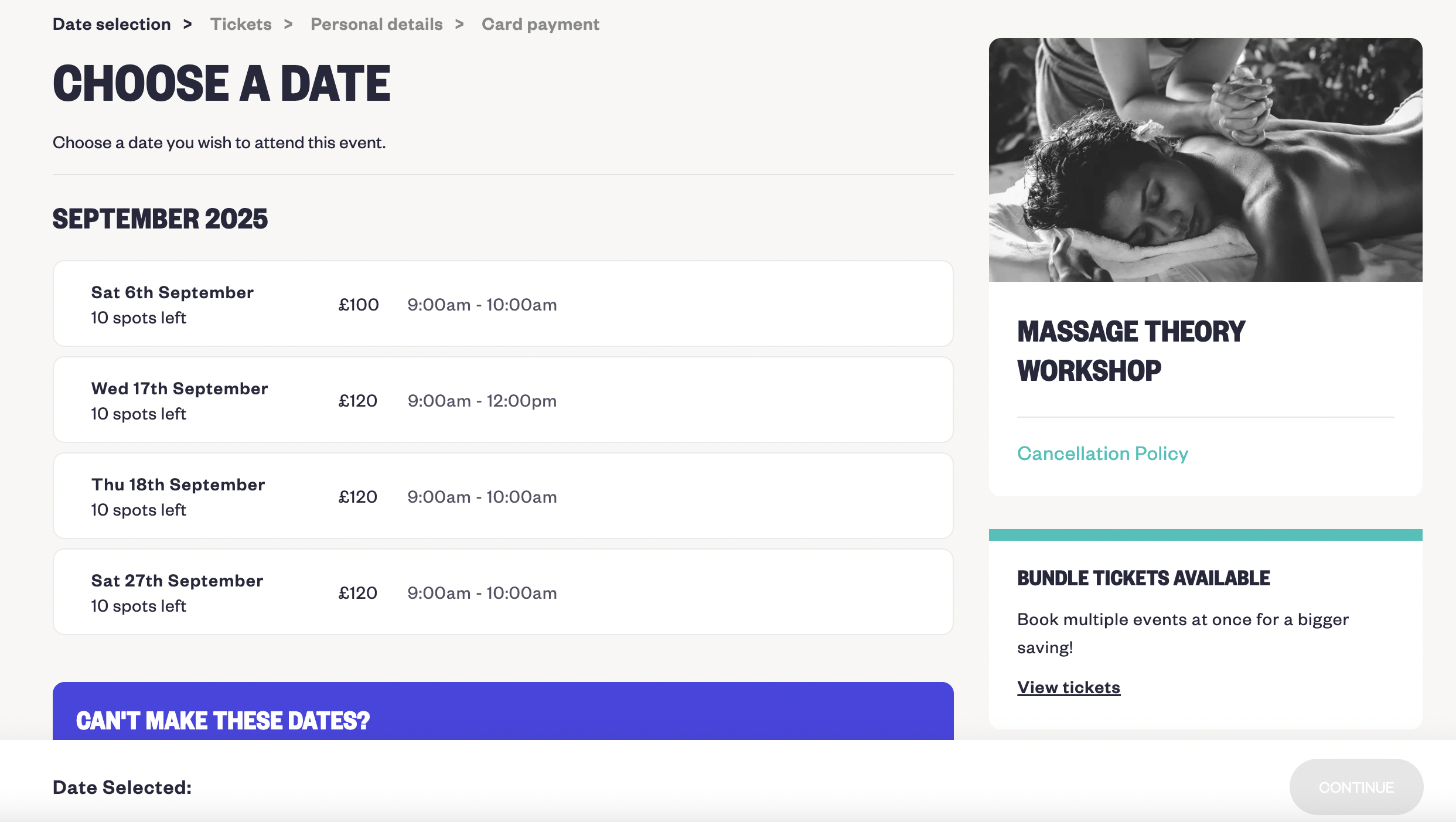
When you schedule a change from a certain date, Baluu applies old and new prices by session date:
Example: Standard ticket £100, change from 15 September:
• Sessions until 15 September stay at £100.
• Sessions after 15 September use the new price you set.
Steps
- Open the listing → Manage → Manage Tickets & Pricing.
- Select the ticket → Edit Ticket.
- In Schedule Price Changes, add the new prices and a short summary.
- Save to apply to relevant sessions.
- Review packs/memberships so prices align across services.
Tip: keep prices consistent across your site, marketplace listings and checkout—mismatches erode trust for students and parents.
The prices playbook
Concrete practices to optimise prices while staying fair to your audience and the market:
- Publish prices on every class/course page and in your FAQs.
- Review prices term‑by‑term; align with tuition levels where relevant.
- Track cost changes; if suppliers raise costs, adjust and explain why.
- Bundle by course or class to increase perceived value without overcomplicating fees.
- Use packs so frequent students get better prices.
- Avoid prices that feel completely out of line with the local market.
- Where demand is high, consider a modest rise—it can be a good time to raise prices.
- Ensure checkout totals match page prices.
- Benchmark against a few competitors and document your method.
- Encourage early sign‑ups when prices will increase at term boundaries.
FAQs (short answers you can reuse)
- Will existing bookings change? No—existing customers keep the original prices and don’t pay extra.
Why did prices change? See the email and FAQ; we explain the improvements in value and experience.
How do tuition and fees work? Listed on the pricing page; checkout shows totals so you can compare easily.
Are we pricier than competitors now? Not necessarily—we benchmark regularly to keep our position aligned to the market while focusing on quality.
Can I still get the old prices? For a short time, yes—sign up in advance to lock them in.
Quick math for confidence
If you raise prices by 10%, you can lose about 9.1% of enrolment and keep revenue level. This helps a business owner weigh trade‑offs and focus on a sensible pricing strategy.
Implementation checklist (+ templates)
- Draft and schedule announcement emails, SMS and in‑class scripts.
- Publish a concise FAQ on tuition, fees and how to pay/register.
- Launch a landing page where students and parents can lock in current prices.
- Configure Baluu: update tickets and schedule the change.
- Refresh course pages and verify checkout totals match the displayed prices.
- Add an info banner/card summarising what’s changing and when.
- After launch, review results, maintain the roadmap and refine practices.
Conclusion
To raise class prices without losing students, keep it simple: decide on a clear plan, set an effective date, and communicate early. Use Baluu to automate the switch, give a short lock‑in window for current prices, and show exactly how the update improves value and quality. Monitor responses, refer back to your plan, and adjust once per term. Done this way, you’ll maintain trust, protect your margins and set your business up for long term success.
Sign up now and start streamlining your bookings today.
Learn more:
- Pricing Psychology for Classes & Events with Custom Booking Software Baluu: How Small Tweaks Boost Bookings
- Appointment Booking Add-Ons: Sell Products Alongside Bookings with Baluu Custom Booking Software
- Why Embedding Baluu Custom Booking Software on Your Website Boosts Professionalism & Trust
- Get Started How To Create An Online Booking System: The Ultimate Guide
Written by
Ruta Jogminaite
Expert in booking systems and appointment-based business optimization.
More to explore
Continue Reading

How Can I Reduce Booking Calls and Messages Without Hiring More Staff?
Learn how to reduce booking calls, messages and front-desk admin using online self-service, automation and AI booking assistants like Baluu’s Junno — without losing the personal touch.
I Already Have a Website — How Do I Add an Online Booking System?
Learn how to add an online booking system to your existing website without rebuilding it. Explore booking integrations, online payments, classes, appointments and how Baluu can help simplify bookings.

Best Booking Software Without Expensive Monthly Fees: What Are Your Options in 2026?
Discover affordable booking software without expensive monthly fees. Compare free, pay-as-you-go and subscription options, learn what features to look for, and see how Baluu combines online bookings with AI-powered assistance.