Running a children's activity business isn't just about delivering fantastic classes.
It's replying to parents after work because someone needs to change sessions.
It's chasing late payments before the next term starts.
It's trying to remember which child is on the waiting list for Saturday mornings.
It's updating spreadsheets, registers and attendance records instead of planning your next class.
Most owners don't notice how much time these tasks consume because they've become part of everyday life.
Until one day they realise they're spending more time managing the business than growing it.
The right booking software changes that.
It won't magically fill every class or replace great coaching, but it can automate many of the repetitive jobs that slow your business down—freeing you to focus on delivering exceptional experiences for children and families.
Whether you're comparing booking systems for the first time or wondering if you've outgrown your current one, this guide will help you make an informed decision.
We'll cover:
- The biggest mistakes activity providers make when choosing software.
- The features that genuinely save time.
- The hidden costs many businesses overlook.
- The questions you should ask before booking a demo.
- The signs it's time to switch platforms.
Most importantly, we'll help you choose software that supports your business not just today, but as it grows over the next several years.Why Choosing the Right Booking Software Matters More Than You Think
Many business owners start with whatever works.
A spreadsheet.
Online bank transfers.
Paper registers.
A free booking tool.
A website with a contact form.
For a while, that's enough.
Then your business grows.
Instead of twenty families, you have two hundred.
Instead of one venue, you're teaching across three locations.
Instead of one weekly class, you're running holiday camps, workshops, birthday parties and memberships.
The systems that once felt simple gradually become the biggest source of frustration.
Parents chase you for invoices.
Staff spend evenings updating registers.
Waiting lists live in notebooks.
Payment reminders are sent manually.
Someone accidentally overbooks a class because availability wasn't updated in real time.
These aren't just inconveniences.
They're hidden costs.
Every hour spent on repetitive administration is an hour you're not spending improving classes, recruiting instructors or growing your business.
That's why choosing booking software shouldn't be seen as another business expense.
It should be viewed as an investment in making your business easier to run.
The Hidden Cost of Manual Administration
Many activity providers underestimate how much manual administration really costs.
Imagine you spend just:
- 10 minutes chasing payments each day
- 15 minutes replying to booking enquiries
- 20 minutes updating attendance
- 15 minutes managing waiting lists
That's one hour every day.
Over a year, that's hundreds of hours spent on tasks that software could automate.
Now imagine that time being redirected towards:
- launching another class
- improving customer experience
- marketing your business
- recruiting new instructors
- planning school holiday programmes
The difference isn't simply convenience.
It's capacity.
The less time you spend managing administration, the more time you have to grow your business.
Why Children's Activity Businesses Need Different Software
One of the biggest mistakes owners make is assuming that all booking systems work the same way.
They don't.
Many platforms were originally designed for industries like salons, fitness studios or appointment-based businesses.
Children's activity providers operate very differently.
Instead of managing individual appointments, you're often managing entire families, recurring classes and long-term customer relationships.
Your software needs to support workflows such as:
- Parents booking on behalf of their children.
- Multiple siblings attending different classes.
- Weekly term bookings.
- Holiday camps.
- Memberships.
- Waiting lists.
- Instructor schedules.
- Medical information.
- Emergency contacts.
- Consent forms.
- Merchandise sales.
- Multiple venues.
- Different age groups and ability levels.
Trying to force software designed for appointments into this environment often creates more work rather than less.
The best platforms are designed around how children's activity businesses actually operate.
What Does Great Booking Software Actually Do?
A surprising number of businesses choose software based on a long feature list.
More features don't automatically mean better software.
The real question is:
Which features remove the biggest headaches from your working week?
Great booking software should reduce the number of repetitive decisions you and your team make every day.
Instead of asking:
"Has this family paid?"
The system already knows.
Instead of checking whether a class is full...
The system updates availability automatically.
Instead of manually emailing every parent about a cancelled class...
One message reaches everyone instantly.
Instead of wondering which classes generate the most revenue...
You already have the data.
Good software doesn't just organise bookings.
It removes friction from running your business.
The Problems Your Booking Software Should Solve
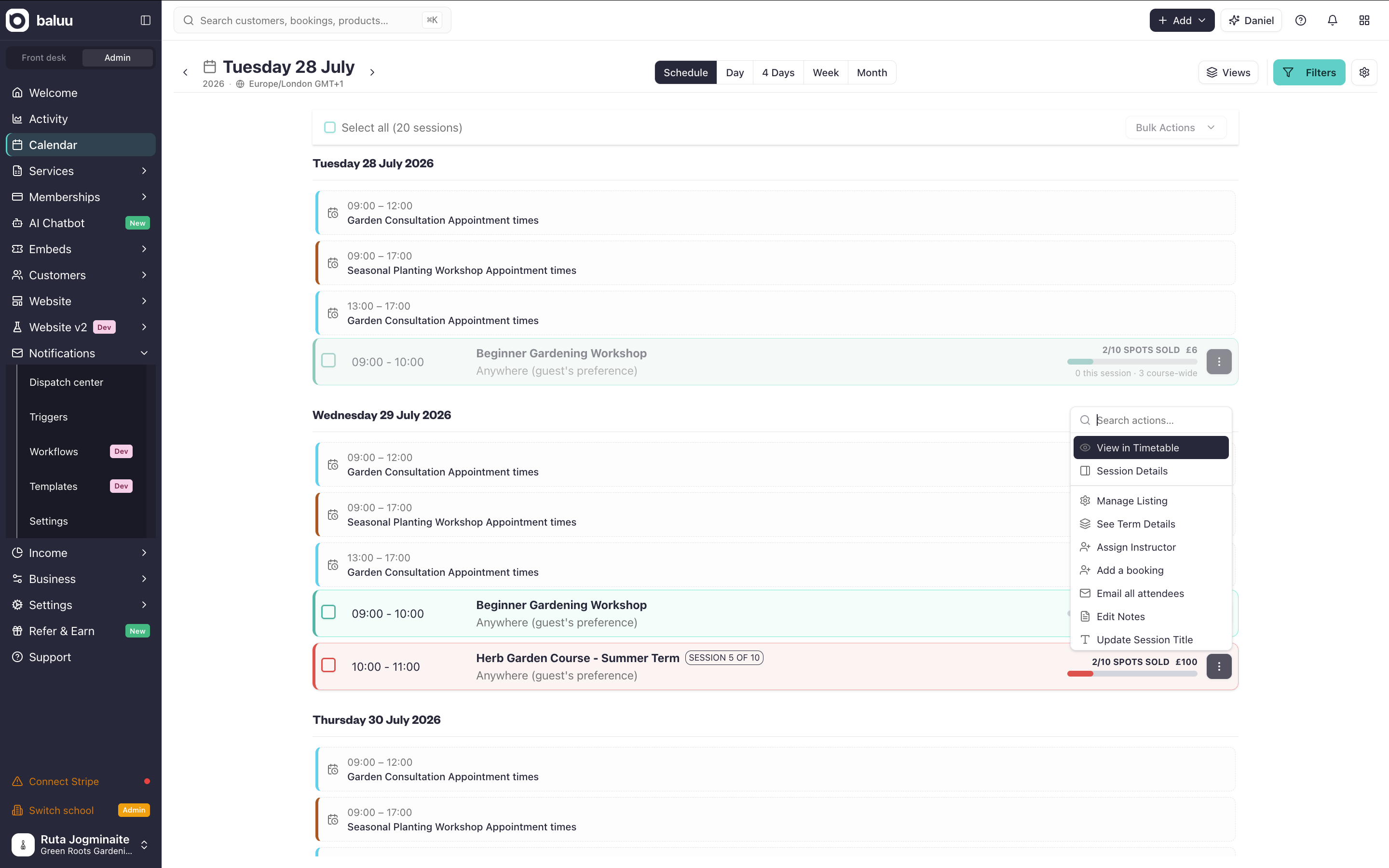
Rather than thinking about software features, think about the everyday problems you face.
Problem: You're Chasing Payments Every Week
Late payments affect cash flow, create awkward conversations and take valuable time away from running your classes.
A modern booking platform should allow parents to pay online, automate recurring payments where appropriate, send reminders and reduce the amount of manual chasing required.
Helpful resources:
https://intercom.help/baluu/en/articles/6299514-stripe-connecthttps://intercom.help/baluu/en/articles/7004633-operational-countries
Problem: Parents Keep Asking the Same Questions
"Is there still space?"
"Can I move my booking?"
"When does next term start?"
"Can I book both children together?"
These questions aren't difficult.
They're repetitive.
A clear online booking experience gives parents the information they need without contacting you every time.
This improves the customer experience while reducing your team's workload.
Helpful resources:
https://intercom.help/baluu/en/articles/6295347-notes-auto-emails
Problem: Classes Fill Up But Empty Spaces Stay Empty
You've probably experienced it.
Someone cancels the night before.
There's a waiting list.
But no one notices the available space until it's too late.
That represents lost revenue.
Modern waiting list automation allows the next family to be notified immediately, helping keep classes full without staff manually contacting every parent.
Helpful resources:
https://intercom.help/baluu/en/articles/6300296-how-does-the-waiting-list-feature-work
The Best Booking Software Helps You Grow—Not Just Stay Organised
Good software should make today's workload easier.
Great software should also support tomorrow's ambitions.
Maybe you're planning to:
- Open another venue.
- Recruit more instructors.
- Launch holiday camps.
- Introduce memberships.
- Sell merchandise.
- Build a new website.
- Expand into franchising.
Choosing software that can support those goals now often saves significant disruption later.
Your booking platform shouldn't become something you outgrow every few years.
It should become part of the foundation your business grows on.
The Features That Actually Save Time (And Why They Matter)
When comparing booking software, it's easy to get distracted by long feature lists and impressive-looking dashboards.
The reality is much simpler.
The best booking software isn't the one with the most features. It's the one that removes the biggest frustrations from your day.
Below are the features that consistently make the biggest difference for children's activity businesses.
1. Online Booking That Parents Can Use Without Help
Parents expect convenience.
Most bookings happen outside traditional office hours—often late in the evening when children are in bed. If booking a class feels confusing or takes too many steps, some families simply won't complete it.
A good booking experience should allow parents to:
- Browse classes by age, location or activity.
- View live availability.
- Book one or multiple children.
- Pay online in minutes.
- Receive instant confirmation.
The fewer questions parents have to ask before booking, the less administration your team has to handle.
Instead of answering:
"How do I book?"
"Is this class full?"
"Can I pay online?"
the booking journey should answer those questions automatically.
Learn more:
https://intercom.help/baluu/en/articles/12538481-step-by-step-guide-to-create-your-baluu-websitehttps://intercom.help/baluu/en/articles/6741850-how-to-share-your-baluu-booking-pagehttps://intercom.help/baluu/en/articles/13285683-how-to-embed-baluu-into-your-website
2. Memberships and Term Bookings Shouldn't Create More Admin
Children's activity businesses rarely operate like appointment-based businesses.
Instead of booking one session, many parents enrol for an entire term or join a recurring membership.
Without software designed for this, businesses often find themselves:
- Creating invoices manually.
- Calculating sibling discounts.
- Adjusting fees for late joiners.
- Chasing recurring payments.
- Updating spreadsheets every new term.
These aren't complicated tasks—but they become time-consuming as your customer base grows.
A booking platform designed for children's activity providers should make these processes routine rather than manual.
Look for features such as:
- Term-based enrolment.
- Recurring memberships.
- Automatic renewals.
- Flexible payment plans.
- Pro-rata pricing.
- Family discounts.
When these happen automatically, staff spend less time on administration and more time supporting customers.
Learn more:
https://intercom.help/baluu/en/articles/14182265-how-to-set-up-and-sell-memberships-on-baluuhttps://intercom.help/baluu/en/articles/6637116-what-is-termly-event-and-how-to-use-it-trials-and-drop-inshttps://intercom.help/baluu/en/articles/6312760-how-to-manage-and-create-discount-codes
3. Waiting Lists Should Fill Empty Spaces Automatically
Every cancelled booking creates two choices.
You either leave the place empty.
Or you spend time contacting families one by one.
Neither is ideal.
If a popular Saturday morning class has ten cancellations across a term, that's ten opportunities to fill those places automatically instead of relying on staff to notice and follow up.
Modern waiting lists should:
- Notify the next family automatically.
- Allow parents to accept the place quickly.
- Update availability in real time.
- Keep classes as full as possible.
For businesses running high-demand classes, this isn't simply a convenience—it can help protect revenue while reducing administration.
4. Payments Should Work in the Background
Ask almost any activity provider which admin task they enjoy least, and chasing payments is likely to appear near the top of the list.
Late payments don't just affect cash flow.
They create awkward conversations with parents, increase administration and make financial planning more difficult.
Modern booking software should help automate this process by supporting:
- Secure online payments.
- Recurring billing.
- Automatic payment reminders.
- Failed payment retries.
- Deposits for camps or events.
- Instalment options where appropriate.
The goal isn't simply collecting money online.
It's creating a payment process that requires as little manual intervention as possible.
Learn more:
https://intercom.help/baluu/en/articles/6299514-stripe-connecthttps://intercom.help/baluu/en/articles/6820732-private-payments-invoices
5. Your Website and Booking System Should Feel Like One Experience
Imagine a parent visits your website.
They find the perfect class.
They click Book Now.
Suddenly they're redirected to a completely different website with different branding.
Many businesses lose trust at exactly this point.
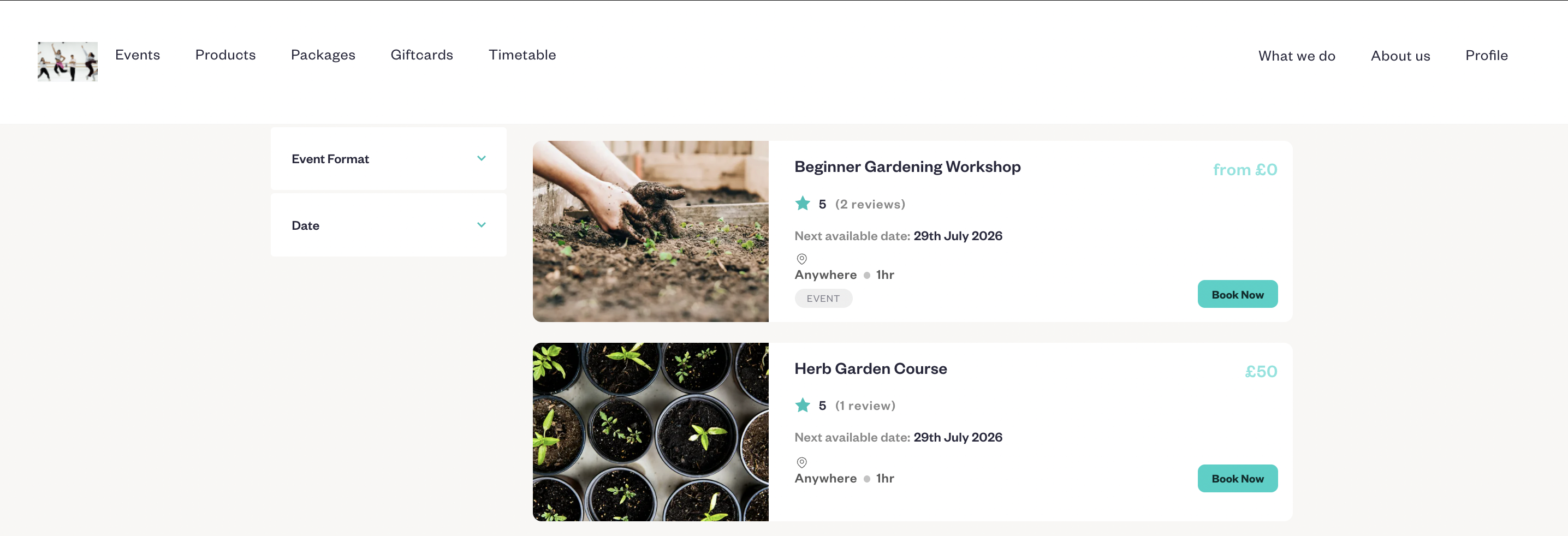
A consistent booking journey feels more professional and gives parents confidence that they're booking with the right organisation.
Whether that's through an integrated website builder or an embedded booking widget, the transition from browsing to booking should feel seamless.
A professional online experience doesn't just improve first impressions—it can also increase completed bookings.
Learn more:
https://intercom.help/baluu/en/articles/13285683-how-to-embed-baluu-into-your-websitehttps://intercom.help/baluu/en/articles/12538481-step-by-step-guide-to-create-your-baluu-website
6. Good Communication Prevents Problems Before They Happen
Think about every email your team sends during a typical month.
Booking confirmations.
Class reminders.
Payment reminders.
Waiting list updates.
Holiday schedules.
Membership renewals.
Now imagine sending every one of those manually.
As your business grows, communication quickly becomes one of the largest administrative tasks.
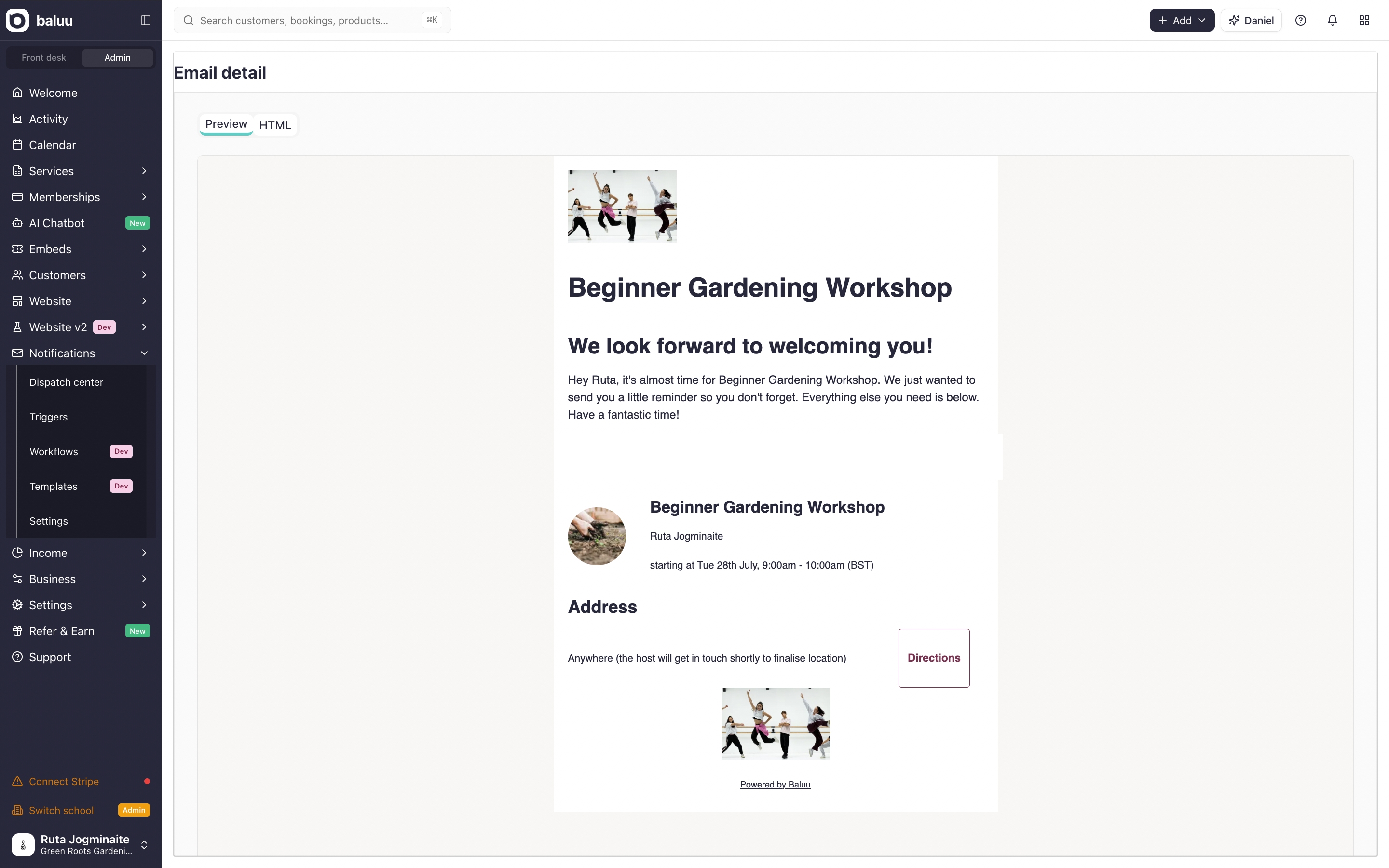
Automation helps ensure parents receive the right information at the right time without creating additional work for staff.
Look for software that supports:
- Automatic confirmations.
- Reminder emails.
- Membership notifications.
- Bulk announcements.
- Class-specific messaging.
Good communication improves customer experience while reducing repetitive administration.
Learn more:
https://intercom.help/baluu/en/articles/6295347-notes-auto-emailshttps://intercom.help/baluu/en/articles/10490149-how-to-review-emails-sent-to-your-customers
7. Reporting Should Help You Make Better Business Decisions
Many business owners know they're busy.
Fewer know exactly why they're growing—or where they're losing opportunities.
Good reporting answers questions like:
- Which classes consistently sell out?
- Which instructors have the highest retention?
- Which locations generate the most revenue?
- Which memberships renew automatically?
- Which holiday camps performed best?
Without this information, decisions often rely on instinct.
With accurate reporting, you can identify opportunities, spot trends early and make decisions with confidence.
8. Family Accounts Make Life Easier for Everyone
Many parents don't have just one child attending activities.
One child might attend gymnastics.
Another football.
A third swimming.
Without family account functionality, parents may need separate bookings, duplicate information and multiple payments.
That creates unnecessary friction.
A booking platform designed for families should make managing multiple children straightforward while reducing duplicate administration for your team.
9. Multi-Location Management Shouldn't Multiply Your Admin
Growth is exciting—but it often introduces new complexity.
One venue becomes three.
One instructor becomes ten.
One timetable becomes dozens.
Without the right systems, administration grows faster than the business itself.
Look for software that supports:
- Multiple venues.
- Staff permissions.
- Central reporting.
- Shared customer records.
- Instructor scheduling.
The right platform should make expansion feel manageable rather than overwhelming.
Feature Comparison Checklist
Feature | Why it Matters | Helpful if You're Growing |
|---|---|---|
Online booking | Makes it easy for parents to book anytime | ✓ |
Memberships | Creates predictable recurring revenue | ✓ |
Term bookings | Simplifies enrolment | ✓ |
Waiting lists | Keeps classes full | ✓ |
Automated payments | Reduces time spent chasing invoices | ✓ |
Website integration | Creates a seamless booking experience | ✓ |
Automated communication | Saves hours every week | ✓ |
Reporting | Helps make informed business decisions | ✓ |
Family accounts | Simplifies bookings for parents | ✓ |
Multi-location support | Essential for expanding organisations | ✓ |
Software Should Help You Scale, Not Hold You Back
The best booking platforms don't simply organise your classes.
They remove repetitive work, improve the customer experience and create the systems your business needs to grow with confidence.
If software still requires constant workarounds, spreadsheets or manual administration, it's worth asking whether the software is supporting your business—or whether your team is supporting the software.
The Biggest Mistakes to Avoid When Choosing Booking Software
Choosing booking software is a decision you'll hopefully only make every few years. Switching later takes time, so it's worth getting it right the first time.
Here are some of the most common mistakes children's activity providers make—and how to avoid them.
Choosing the Cheapest Option
Saving £30 a month might seem like a smart decision.
But if cheaper software means spending an extra five hours every week chasing payments, updating registers or answering booking enquiries, it's probably costing far more than it saves.
When comparing platforms, think about total value, not just monthly subscription costs.
Focusing Only on Today's Needs
Many businesses choose software based on their current size.
Ask yourself:
- What happens if I double my student numbers?
- What if I open another venue?
- What if I introduce memberships?
- What if I hire five more instructors?
The best booking software should grow with your business instead of forcing you to change platforms every few years.
Ignoring the Parent Experience
During demonstrations, it's easy to focus on the admin dashboard.
But your customers never see that.
They experience the booking journey.
Before choosing any platform:
- Complete a booking on your phone.
- Try cancelling and rebooking.
- Test how long the process takes.
- Ask someone who has never used the system to try it.
If parents find booking frustrating, you'll lose enquiries before they become customers.
Underestimating Migration
Changing booking systems isn't just installing new software.
You'll usually need to move:
- Customer records
- Timetables
- Memberships
- Payment information
- Waiting lists
- Historical bookings
Ask every provider:
"What help do you provide when moving from another system?"
Good migration support can save weeks of work.
Paying for Features You'll Never Use
More isn't always better.
The right platform isn't the one with 300 features.
It's the one that solves your biggest operational problems.
Choose software that matches how your business runs.
Questions to Ask Before Booking a Demo
Whether you're comparing two providers or ten, ask the same questions every time.
✔ Can parents book multiple children from one account?
✔ Can the system manage both term bookings and memberships?
✔ Can payments be collected automatically?
✔ What happens if a payment fails?
✔ Are waiting lists automated?
✔ Can bookings be restricted by age or ability?
✔ Can I manage multiple venues?
✔ Is reporting included or is it an extra cost?
✔ Does the website integrate with bookings?
✔ Can staff have different permission levels?
✔ How long does migration usually take?
✔ What support is available after launch?
The answers to these questions will often tell you more than a feature list ever could.
Signs You've Outgrown Your Current Booking System
Sometimes the problem isn't your business.
It's the software.
If any of these sound familiar, it may be time to consider switching.
- You're still using spreadsheets alongside your booking system.
- Staff spend hours every week chasing payments.
- Parents regularly contact you to make simple booking changes.
- Waiting lists are managed manually.
- Reports don't give you the information you need.
- Your website and booking system feel disconnected.
- Adding new classes creates unnecessary admin.
- Opening another venue feels complicated.
- Your team spends more time working around the software than using it.
Growing businesses eventually outgrow systems that were designed for simpler operations.
Modern platforms designed specifically for children's activity providers bring bookings, payments, communication, reporting and customer management together in one place—reducing the need for multiple disconnected tools.
Frequently Asked Questions
What's the difference between booking software and scheduling software?
Scheduling software focuses on calendars and appointments.
Booking software for children's activity businesses manages much more, including term bookings, memberships, family accounts, waiting lists, payments and customer communication.
Do I need a separate payment provider?
Not necessarily.
Many modern booking platforms include integrated online payments, allowing families to pay securely while reducing manual administration.
Learn more:
https://app.baluu.io/settings/current-stripe-accounthttps://intercom.help/baluu/en/articles/6299514-stripe-connect
Is a website builder worth it?
For many businesses, yes.
Parents expect a professional online experience. Having your website and booking journey work together creates a smoother experience and often reduces booking drop-offs.
When is the best time to change booking software?
Many providers choose to migrate between terms or before launching a new season, giving staff time to prepare before registrations open.
How long does migration usually take?
It depends on the size of your organisation and the amount of data being transferred.
A provider with a structured onboarding process and migration support can significantly reduce the time involved.
Should I choose specialist booking software?
Businesses that run children's activities often benefit from software designed specifically for their workflows, including family accounts, memberships, recurring classes, waiting lists and term-based enrolment.
Final Thoughts
The best booking software isn't simply the one with the longest feature list.
It's the one that helps you spend less time on administration and more time delivering outstanding experiences for the families you support.
As your organisation grows, every manual task becomes more expensive.
Chasing payments.
Updating spreadsheets.
Managing waiting lists.
Sending reminders.
Answering repetitive booking questions.
The right platform helps automate these processes, giving your team more time to focus on coaching, teaching and growing the business.
Before making a decision, compare providers carefully, test the booking experience from a parent's perspective and think about where your organisation will be in three years—not just where it is today.
If you're looking for a platform built specifically for children's activity businesses, explore how Baluu brings together online bookings, memberships, payments, waiting lists, communication, reporting and website management in one place.
Helpful resources:
https://intercom.help/baluu/en/articles/14887320-how-to-create-and-send-newsletters-in-baluuhttps://intercom.help/baluu/en/articles/6313384-how-do-i-create-gift-cardshttps://intercom.help/baluu/en/articles/14805863-managing-tickets-pricing-tickets-v2https://intercom.help/baluu/en/articles/13600483-how-to-use-your-bundle-customer-guidehttps://intercom.help/baluu/en/articles/12571065-how-to-create-bundles-v2- https://www.baluu.co.uk/blog/how-to-get-your-first-100-customers-10-proven-strategies-for-new-businesses
- https://www.baluu.co.uk/blog/how-custom-booking-software-improves-the-customer-booking-experience
- https://www.baluu.co.uk/blog/stop-chasing-customers-for-forms-a-better-way-to-collect-information-before-booking
Written by
Ruta Jogminaite
Expert in booking systems and appointment-based business optimization.
More to explore
Continue Reading

How to Get More Bookings for Your Classes: 12 Proven Ways
Struggling to fill your classes? Discover 12 practical ways to attract new customers, increase bookings, fill empty spaces and turn first-time visitors into regulars.

AI Booking Software With Human Support: Why Baluu Gives You Both
Discover how Baluu combines AI booking software with real human support, helping small businesses manage classes, courses, events and appointments without being left to figure everything out alone.

Why Choose Baluu? Flexible Booking Software With Real Human Support
Discover why Baluu is a flexible online booking system for classes, courses, appointments and events, with powerful booking tools, flexible pricing and real human support to help you get set up and start taking bookings.