If you already have a website but you're still taking bookings by phone, email, DMs or spreadsheets, you probably don't need a new website. You need an online booking system that works with the website you already have.
Booking software can handle availability, bookings, payments, customer details, confirmations and reminders while your existing website remains your main online presence.
For businesses offering classes, courses, workshops, events or appointments, a platform such as Baluu can provide the booking system behind your existing website — without requiring you to rebuild it.
Here's how it works and what to look for when choosing a booking system.
Can I add a booking system to my existing website?
Yes. You can add an online booking system to an existing website without rebuilding it.
There are two straightforward ways to use a booking platform such as Baluu:
- Integrate booking into your existing website — add Baluu's booking widget or Book Now button to your current website so customers can start booking from there.
- Share your Baluu booking page — use the direct link to your Baluu-hosted booking page and share it through social media, email, WhatsApp, QR codes or anywhere else you promote your business.
You can also use both.
For example, you might integrate Baluu into your main website while sharing your Baluu booking page directly when promoting a particular class or workshop on social media.
Either way, you can keep the website you've already built.
Should I integrate booking into my website or share my booking page?
Both options can work, and many businesses use a combination of the two.
Integrate booking into your website if:
- You already have an established business website
- You want customers to start booking from your website
- You have dedicated pages for your classes, workshops, activities or services
- You want your existing website to remain the main customer journey
With Baluu, you can use website integration options such as a booking widget or Book Now button.
Share your Baluu booking page if:
- You want a direct link customers can use to browse and book
- You promote your business through Instagram, Facebook or other social channels
- You send booking links through email or WhatsApp
- You want to add booking access to a QR code
- You want to start accepting online bookings without making significant changes to your existing website
You don't have to choose one permanently. Your website integration can handle visitors already browsing your site, while your Baluu booking page gives you a convenient direct link to share elsewhere.
Can customers see availability and pay online?
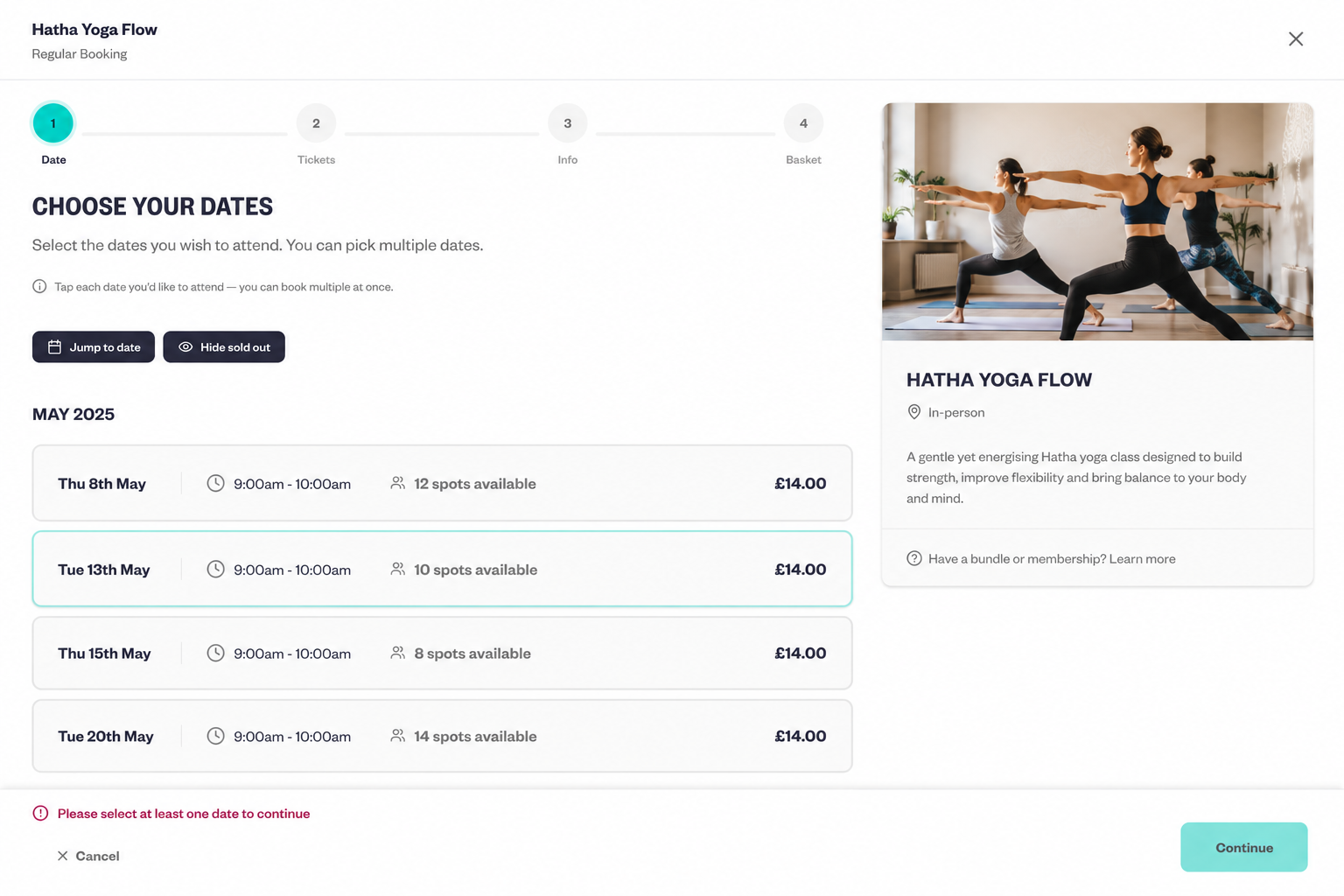
Yes. A good online booking system should allow customers to see what's available and complete their booking online.
Instead of someone emailing, “Do you have any spaces on Tuesday?”, they can check available sessions themselves and make a booking.
For paid activities or services, online payments also remove much of the manual work involved in sending payment details and checking whether someone has paid.
Baluu combines online booking and payment management for classes, events and appointments, allowing businesses to manage their schedule, bookings, customers and payments from one system.
What if I run classes or courses rather than appointments?
This is an important consideration when choosing booking software.
A basic appointment scheduler is generally designed around one customer booking one available time slot with one person or service.
That can work perfectly well for consultations, private lessons and other one-to-one services.
But businesses running classes, courses, workshops and activities often need more.
For example, you may need to manage:
- Multiple attendees in one session
- Maximum class capacity
- Recurring sessions
- Whole terms or courses
- Multi-day activities
- Workshops and events
- Different tickets or pricing options
- Deposits or instalments
- Bundles
- Memberships
- Waiting lists
If your business offers these types of bookings, look beyond basic appointment scheduling software.
Baluu is designed to manage classes, events and appointments within the same booking platform, making it suitable for businesses that offer several different types of bookable experiences.
A yoga business, for example, could offer weekly classes, a six-week course, workshops and private appointments without needing separate booking systems for each.
Can customers book multiple dates or a whole course?
If you run terms, courses, camps or blocks of sessions, this should be one of the things you check before choosing your booking software.
Booking every session individually creates unnecessary work for both the customer and the business.
Imagine a children's activity provider running a class every Monday for six weeks. Ideally, a parent should be able to purchase the term as a block rather than completing six separate bookings.
A flexible booking system should therefore support the different ways businesses actually sell their activities, including individual sessions, multiple dates, terms or blocks.
Baluu supports termly and block bookings, alongside options for businesses selling recurring classes and multi-session experiences.
This can be particularly useful for:
- Children's classes and clubs
- Sports coaching
- Dance schools
- Yoga and Pilates businesses
- Art and pottery studios
- Cooking schools
- Holiday activities
- Courses and workshops
What features should I look for in a booking system?
The best booking system isn't necessarily the one with the longest feature list. It should match the way your particular business operates.
Useful features to consider include:
- Website integration — can booking be added to the website you already have?
- A shareable booking page — can you send customers directly to your booking page?
- Online payments — can customers book and pay within the same process?
- Live availability — can customers see which dates or sessions they can book?
- Capacity management — can you control how many people attend a class or event?
- Recurring and termly bookings — can you manage activities that happen across multiple dates?
- Multi-date booking — can customers select more than one date where appropriate?
- Deposits and instalments — useful for higher-value courses, events and activities.
- Bundles — useful for businesses selling multiple sessions together.
- Memberships — useful for businesses with frequent repeat customers.
- Waiting lists — so demand isn't immediately lost when an activity fills up.
- Discount codes — useful for promotions and special offers.
- Automated communications — confirmations and reminders can reduce repetitive administration.
- Customer management — so customer and booking information isn't spread across inboxes and spreadsheets.
Think about how customers actually buy from you before comparing platforms.
If you run a pottery studio, for example, you might need capacity-controlled workshops and multi-week courses. A private tutor may primarily need appointments. A children's activity business might need term bookings and attendee information.
Those are very different requirements even though all three businesses are searching for “booking software”.
What's the difference between appointment scheduling and class booking software?
They overlap, but they're not necessarily designed for the same job.
Appointment scheduling software
Usually focuses on:
- One-to-one bookings
- Available time slots
- Individual staff calendars
- Rescheduling and cancellations
- Consultations and private services
Class and activity booking software
Usually needs to handle:
- Multiple customers attending the same session
- Capacity limits
- Recurring classes
- Courses and terms
- Multiple dates
- Events and workshops
- Different ticket options
- Bundles and memberships
- Waiting lists
If you only take straightforward one-to-one appointments, a simple appointment scheduler may be all you need.
If you run classes, courses, workshops, events or activities alongside appointments, a broader booking platform can be more suitable.
This is where Baluu is particularly relevant: it is designed for businesses selling classes, events and appointments, rather than being limited to a traditional one-to-one scheduling calendar.
Do I need a developer to add booking to my website?
Usually, no.
If you use your Baluu booking page, you simply have a link that can be shared directly with customers.
If you want booking integrated into your existing website, Baluu provides website integration options including its booking widget and Book Now button.
Most modern website platforms provide ways to add third-party integrations or code without rebuilding an entire website.
You may need technical help if your website is completely custom-built or you want a highly bespoke implementation, but adding online booking does not normally mean commissioning a new website.
Can I use booking software with WordPress, Wix, Squarespace or another website builder?
In many cases, yes.
What matters is whether your website allows you to add the integration provided by your booking platform.
Alternatively, you can keep your website exactly as it is and share your Baluu booking page separately.
This means your website platform and booking platform don't have to be the same system.
Your website can continue handling your branding, information, SEO and marketing, while your booking software handles availability, bookings, customers and payments.
How does Baluu work with an existing website?
If you already have a website, you don't need to replace it to use Baluu.
Baluu can act as the booking system behind your existing website.
A typical setup could look like this:
- Create your classes, courses, events or appointments in Baluu.
- Add your dates, availability, capacity and pricing.
- Integrate Baluu with your existing website using the available website booking options.
- Customers browse and book online.
- Alternatively, share your Baluu booking page directly through social media, email, WhatsApp or a QR code.
- Manage your bookings, customers and schedule through Baluu.
Your existing website continues doing the job it was built for, while Baluu handles the booking process.
Practical example: adding booking to an existing pottery studio website
Imagine you run a pottery studio and already have a website.
Your Classes page explains your workshops, but customers currently have to email you to ask whether a particular class has space.
You then have to:
- Check availability
- Reply to the customer
- Collect their information
- Arrange payment
- Add them to your attendee list
- Send confirmation details
Instead of rebuilding the website, you could create your workshops and courses in Baluu and integrate booking into your existing site.
A customer could then visit your website, choose a workshop, check availability, book and pay online.
You could also share your Baluu booking page directly when promoting an upcoming workshop on social media or through email.
Your website remains your website. Baluu handles the booking infrastructure behind it.
The same approach can work for a yoga teacher selling classes and courses, a cooking school running workshops, a children's activity provider selling termly sessions or a service business taking private appointments.
Can AI help customers book?
Booking software is also starting to move beyond traditional calendars and booking forms.
Baluu includes Junno, its AI booking assistant, designed to help businesses answer customer questions and assist with bookings.
For businesses receiving repetitive questions about availability, classes or booking options, this provides another way for customers to interact with the booking system alongside the traditional online booking journey.
It also reflects a broader change in booking software: the goal isn't simply to put a calendar online. It's to reduce the amount of manual work required to turn an interested customer into a confirmed booking.
How much does it cost to add a booking system to a website?
The cost depends on the booking platform and pricing model you choose.
Booking software commonly charges through:
- Monthly subscriptions
- Booking or transaction fees
- Payment processing fees
- Paid feature tiers
- Optional add-ons
- Or a combination of these
When comparing systems, don't look only at the headline monthly price.
Check whether there are limits on bookings, classes, staff or customers; whether payment processing costs are separate; and whether features such as website integration require a higher plan.
Baluu offers a free plan, making it possible for businesses to start using the platform without committing to a large monthly software subscription.
Because pricing and plan features can change, check Baluu's current pricing page for the latest information before deciding which option is right for your business.
Is Baluu a good booking system if I already have a website?
Baluu is worth considering if you already have a website and need an online booking system for classes, courses, workshops, events or appointments.
Rather than replacing your existing website, Baluu can provide the booking infrastructure behind it.
You can integrate booking into your website using Baluu's website integration options or share your Baluu booking page directly with customers.
Baluu is particularly relevant for businesses whose requirements go beyond a simple appointment calendar — for example, businesses managing group classes, terms, courses, events, multiple dates, memberships or a mixture of classes and appointments.
If all you need is a basic one-to-one meeting scheduler, a simpler scheduling tool may be sufficient.
But if your business needs customers to discover availability, book and pay for different types of activities online, choosing software designed around those booking models can remove a significant amount of manual administration.
FAQ
Can I add a booking system to my existing website?
Yes. You can integrate booking software with an existing website without rebuilding the entire site. With Baluu, you can add website booking options or share your Baluu booking page directly with customers.
Do I need a new website to take online bookings?
No. Your existing website and booking software can work together. Your website can continue handling your content and marketing while the booking platform manages bookings, availability and payments.
What is the best booking system if I already have a website?
It depends on what you're selling. A basic appointment scheduler may be enough for simple one-to-one services. Businesses offering classes, courses, workshops, events and appointments may benefit from a broader booking platform such as Baluu.
Can I embed Baluu into my existing website?
Yes. Baluu provides website integration options, including a booking widget and Book Now button, so you can add booking functionality to your existing website.
What is a Baluu booking page?
Your Baluu booking page is a hosted page where customers can browse and book what you offer. You can share the link directly through social media, email, WhatsApp, QR codes and other marketing channels.
Can customers pay when they book online?
Yes. Baluu supports online booking and payments, allowing customers to complete payment as part of their booking journey where applicable.
Does Baluu work for classes as well as appointments?
Yes. Baluu is designed for classes, events and appointments, making it suitable for businesses offering group activities as well as one-to-one bookings.
Can I use Baluu for courses or termly classes?
Yes. Baluu supports termly and block bookings, making it suitable for businesses selling courses, terms and other multi-session activities.
Can I use Baluu without a website?
Yes. You can use and share your Baluu booking page even if you don't want to integrate booking into a separate website.
Do I need a developer to add online booking?
Usually not. Sharing a Baluu booking page doesn't require development work, while website integration can typically be added to an existing site. More complex custom websites may require technical assistance.
Does Baluu have a free plan?
Yes. Baluu has a free plan, allowing businesses to start taking bookings without committing to a large monthly software subscription. Check Baluu's current pricing page for the latest fees and plan details.
Add online booking without rebuilding your website
If your website already represents your business well, you shouldn't need to replace it simply because you've outgrown manual bookings.
Instead, add a booking system that handles the operational work your website currently can't: availability, scheduling, capacity, payments, customer information and booking communications.
For businesses offering classes, courses, workshops, events and appointments, Baluu can work alongside the website you already have, giving customers a straightforward way to book while giving you one place to manage the process.
You can integrate Baluu with your existing website, share your Baluu booking page directly, or use both — allowing your booking setup to grow alongside your business.
Written by
Ruta Jogminaite
Expert in booking systems and appointment-based business optimization.
More to explore
Continue Reading

How to Get More Bookings for Your Classes: 12 Proven Ways
Struggling to fill your classes? Discover 12 practical ways to attract new customers, increase bookings, fill empty spaces and turn first-time visitors into regulars.

AI Booking Software With Human Support: Why Baluu Gives You Both
Discover how Baluu combines AI booking software with real human support, helping small businesses manage classes, courses, events and appointments without being left to figure everything out alone.

Why Choose Baluu? Flexible Booking Software With Real Human Support
Discover why Baluu is a flexible online booking system for classes, courses, appointments and events, with powerful booking tools, flexible pricing and real human support to help you get set up and start taking bookings.