The owner at 8am wants to know what happened overnight and what needs a decision. Then coffee.
 Their job: run the day
Welcome to part 2 of our year-end announcements. Part 1 rebuilt the screen you open most, your calendar. This time we've done the rest of the house: the menu, the lists, the settings, and that little bell in the corner.
Why we rebuilt it
Baluu grew one feature at a time, and so did its menu. By this year it had turned into a till receipt: bookings tucked away under income, settings in four different places, and a word like “Notifications” meaning two different things depending on where you clicked. You learned where everything lived, because you had to. We're sorry about that.
Nobody opens their dashboard to browse. You open it with a job in mind, and the job changes with the hour.
The owner at 8am wants to know what happened overnight and what needs a decision. Then coffee.
Their job: run the dayThe front desk wants a listing's next date and whether it's ready to take bookings, without losing their place in the list.
 Their job: check a class
The teacher between classes wants a quick look on their phone, and a way to ask a question. Then back to work.
 Their job: a quick check
In part 1 we stopped guessing what your calendar should look like and handed you the building blocks instead. That idea turned out to be bigger than the calendar. So we applied it to everything.
What we did instead
Your dashboard is now built from three things. The jobs, which are the same for every business. The features, which are the ones your business actually uses. And your shortcuts, which are yours alone.
Jobs
the menu: Today, Calendar, Bookings, Customers, Offerings, Grow, Automations, Junno, Money, Website
Features
the ones you've switched on in Explore Baluu, and nothing you haven't
Shortcuts
your pinned pages and saved views
Your dashboard
Saved views were the best thing we shipped on the calendar. Now your lists have them too, and any page or view can be pinned to your menu.
Year-end 2026 · Part 2 of 8
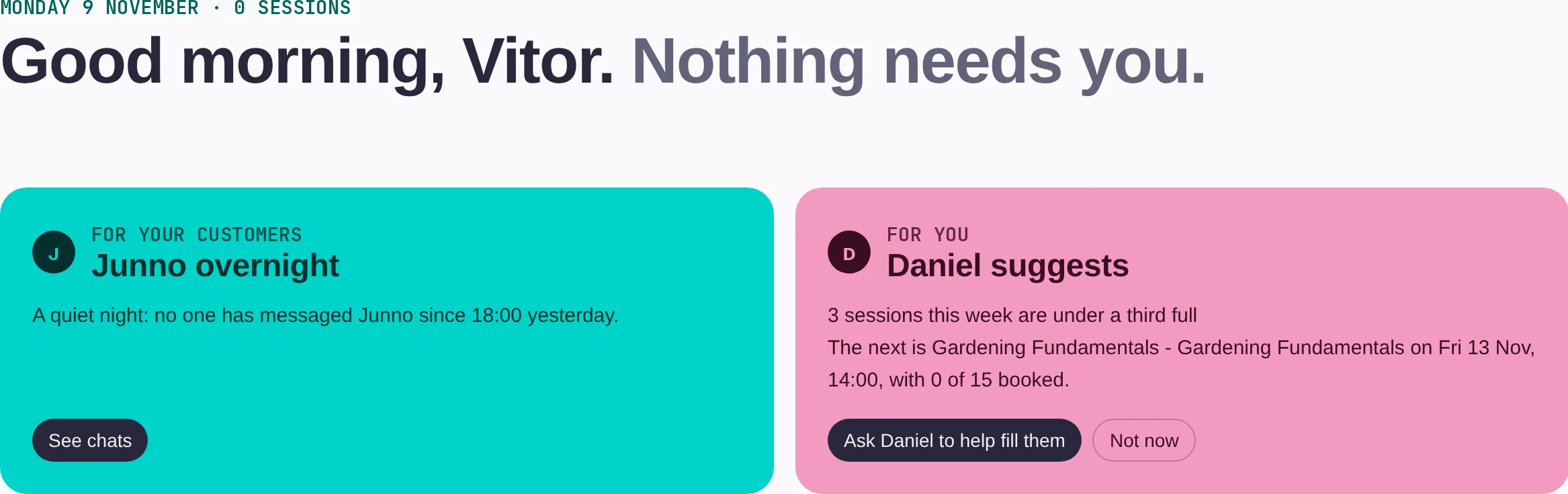
Overview is gone. In its place is Today, and it opens with a sentence, not a chart: “Good morning, Vitor. 3 things need you.” Or, on a good day, “Nothing needs you.” Underneath, two cards from your assistants, then today's sessions with places booked and a Check in button, and a “Needs you” list for anything waiting on a person.
Junno overnight
What your customers did while you slept: chats answered, bookings taken, and anything Junno handed over for you to answer.
Daniel suggests
One thing worth doing. “3 sessions this week are under a third full”, with a button to ask Daniel to help fill them.
Then the numbers
Revenue, bookings, new customers, sessions, waiting list joins and occupancy sit under “How it's going”, for today, this week or this month.
Ten entries, named for what you're doing: Today, Calendar, Bookings, Customers, Offerings, Grow, Automations, Junno, Money and Website. Offerings is everything you sell, so listings, bundles, products, membership plans and gift cards finally live together. Bookings holds your bookings, orders, invoices and waiting list, where you'd expect them. We've fixed the names that collided too: the emails your customers receive are now called Customer messages, and the chatbot is simply called Junno.
A new page, Explore Baluu, lists everything Baluu can do with an On/Off switch for each. Switch a feature on and it appears in everyone's menu. Switch it off and it's out of the way, not gone. Nothing changes for your customers either way.
Pin any page with the ☆ next to its title, or pick one from Add a shortcut, and it sits in your menu under Your shortcuts. Shortcuts are personal, so the front desk's menu needn't look like the owner's.
Open Offerings and it's all there. Add anything from the one + Add button at the top of every page.
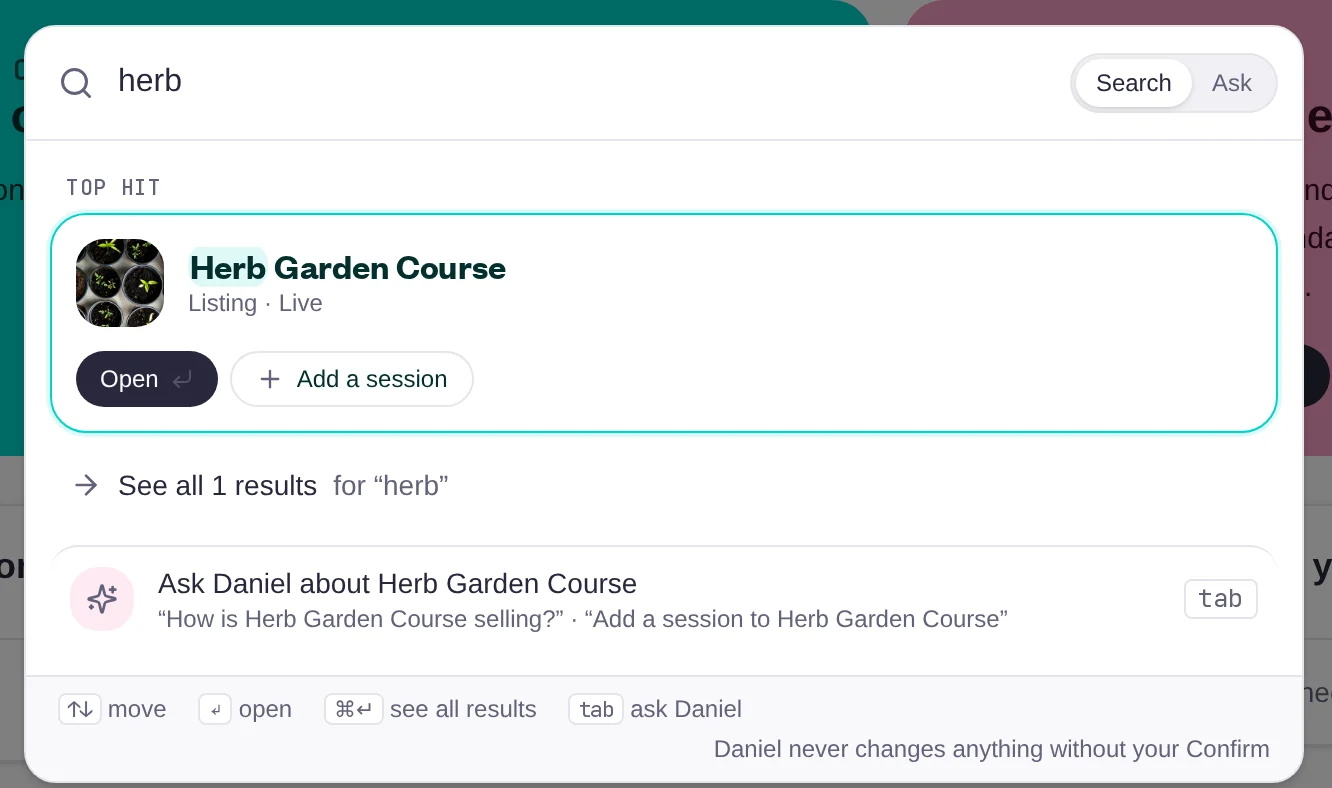
Search and Daniel used to be two different places. Now there's one bar at the top of every page (or ⌘K on a keyboard). Type a name and the top hit comes up with its own buttons: open the listing, add a session. Press Tab and the same words go to Daniel instead. Daniel never changes anything without your Confirm.
Want more than a quick question? Ask Daniel (⌘J) opens Daniel's own panel, where he can look things up, make changes for you and build reports. He always checks with you before saving.
It opens with the things he's asked most: which sessions are less than half full, revenue per week for the last three months, export last month's bookings, what discount codes you have.
Open any listing or booking from its list and the sheet ends with Ask Daniel, plus a couple of questions worth asking about that record.
Daniel
Your AI assistant
Bookings, customers and listings share one pattern. Tabs across the top for the lists you need most, so Bookings opens on All, Today, Awaiting payment or Balance due, and Listings on Live, Drafts or Archived. One Filter button, one Display button for your columns, one Export. Click anywhere on a row to open it.
Opening a listing or a booking slides it in from the side, over the list. The things you'd want are right there: for a listing, its next date, how many sessions are coming up and whether it's ready to take bookings; for a booking, the payment link, Reschedule and Email. Step through the list with the arrows, and your filters and scroll position stay put. Full page is one click away when you need it.
Filter the Customers list the way you want it, then save it as a view and open it in one click from the Views menu.
Settings used to be scattered across four menu entries. Now it's one page of grouped cards, each setting with a line saying what it does, and a search box across all of them. Type “remind” and the reminder emails come straight up. Still can't find it? There's a button to ask Daniel to change the setting for you.
The bell used to be a long list of everything that ever happened. Now there's one Notifications page with four tabs: All, Needs you, Unread and Archived. Needs you is the booking request waiting for your approval, or the question a customer asked Junno that only you can answer. New bookings and cancellations sit under All, and anything you've dealt with can be archived. Clicking a notification opens the record it's about.
Click the bell and you get your unread notifications, Mark all as read, and a link to the full page when you want it. On a quiet day it just says you're all caught up.
The dock at the bottom of your phone is now five things you actually use: Menu, Calendar, Ask in the centre, Add and your Inbox. Ask is the same Search or ask bar as on desktop, so you can find a customer or ask Daniel a question without leaving the class you're teaching.
Notification settings are personal. A teacher hears about their own classes without filling the owner's inbox. Pick what reaches you in Baluu and what reaches you by email. Things that need you always reach you in Baluu, so nothing gets stuck.
Swap one email per booking for one daily summary: what's waiting on you and what came in since the last one, at the time you choose. Nothing to report, no email.
Start on Today, pin your first shortcut, and open a listing from the list. Then tell us what we got wrong. We read every reply, and the menu you're looking at came from the last batch.
That's part 2 of 8. Part 3 is coming soon, and it's the screen your customers see first. 👀
— Vitor and the Baluu team
See all updatesParts 4 to 8 are coming soon.