Part 1 of 7: Stop fitting your business to our calendar
There's no such thing as the perfect calendar, so we stopped trying to build one. Eight new calendar types, a rebuilt Day, Week and Month, and saved views for you or your whole team. Build the calendar your business actually needs.
Hey everyone, and welcome to part 1 of 7 of our year-end announcements. 🎉
If it's felt a little quiet around here lately, there's a reason: we've been building. A lot. Over the next seven posts we're going to show you everything, and tell you honestly _why_ we built it the way we did.
We're starting with the screen you probably open more than any other: your calendar.
Just want the new stuff? Jump straight to the changes.
---
The perfect calendar doesn't exist
For years, Baluu had one schedule calendar. Then we added Day, Week and Month, and we worked hard to make them good enough for everyone.
They never were. And here's the uncomfortable truth: they never could have been. We were answering the wrong question.
We kept asking "how do we squeeze as much information as possible onto one screen?" But a workshop, a tour operator and a rental company don't want more information. They want different information, from the same bookings:
- 🎨 A workshop needs to see capacity at a glance, so they know early whether Saturday's class will run or needs cancelling.
- 🧭 A tour operator needs a run sheet: what starts when, who's on it, who's leading it.
- 🚲 A rental company needs a resource timeline, with every bike, room or kayak down the side and the hours running across the top.
That's exactly why most booking software picks one type of business and ignores everyone else.
But it goes deeper than business type. Give two pottery studios the "perfect" workshop calendar and they'll still want different things, because people are people. Even inside one team, the front desk wants today's Day view to run the doors, while the manager wants the whole month to see where the business is heading.
One calendar can't serve all of them. So we stopped trying.
So we gave you the building blocks instead
Rather than guess what your calendar should look like, we built the pieces and handed them to you:
- Filters: which sessions you see.
- Calendar types: how you see them.
- Settings: what each session shows, and how it's coloured.
Mix them, then save the result as a view. "Month capacity" might be a heatmap of the next four weeks. "Front desk" might be today's Day view with check-in front and centre. Make as many as you like, switch between them in one click, and decide whether each one is just for you or for your whole team.
Yes, setting up your first view takes a few minutes. After that, your calendar works the way you think, every day.
---
The changes
Here's everything that's new. 👇
🗂️ Saved views: set it up once, use it every day
Change anything on the calendar (the type, the filters, the colours) and a bar slides up showing exactly what changed. One click saves it as a new view or updates the one you're on.
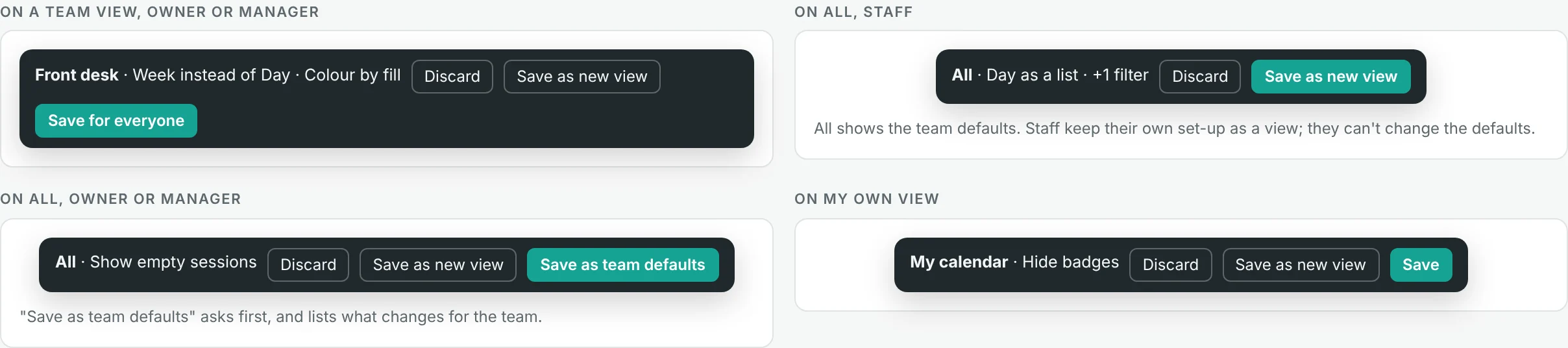
The save bar shows what changed, with Discard, Save as new view and Save for everyone
- Team defaults. Owners and managers set the calendar everyone starts from. Staff can't break it by accident, but they're free to save their own personal views.
- Undo, always. Saved something by mistake? Undo it straight away.
- Nothing lost. Already customised your calendar? We've kept your setup as a personal view called "My calendar", so tomorrow it looks exactly like it did today.
🧭 Eight new ways to see your business
Alongside Schedule, Day, 4 Days, Week and Month, there's now a More types menu. Pick a type, tune it, save it as a view.
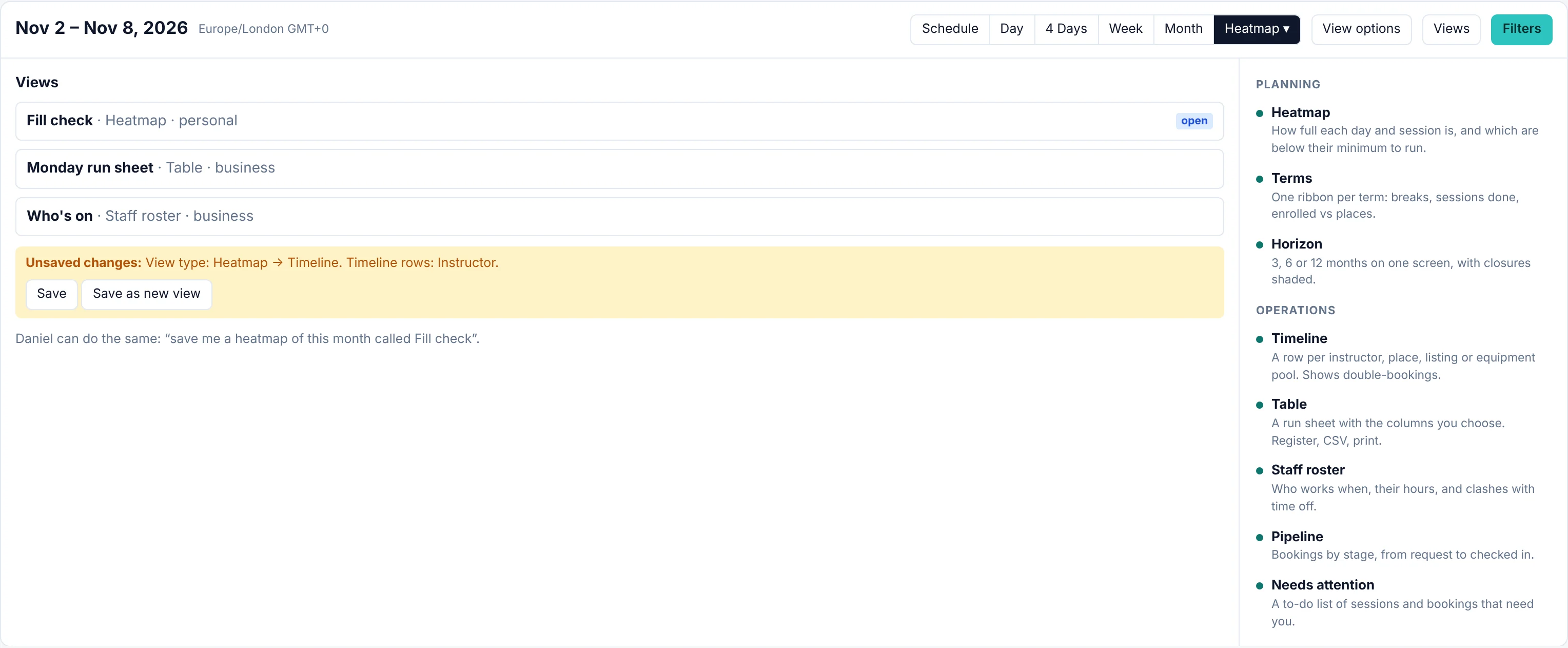
The calendar type picker with saved views
🔥 Heatmap: will it run?
Your whole month in one glance. Every day is shaded by how full it is, every session shows booked against places, and a ▼ flags anything below the minimum it needs to run. Spot the quiet sessions while there's still time to fill them, instead of discovering them the night before.
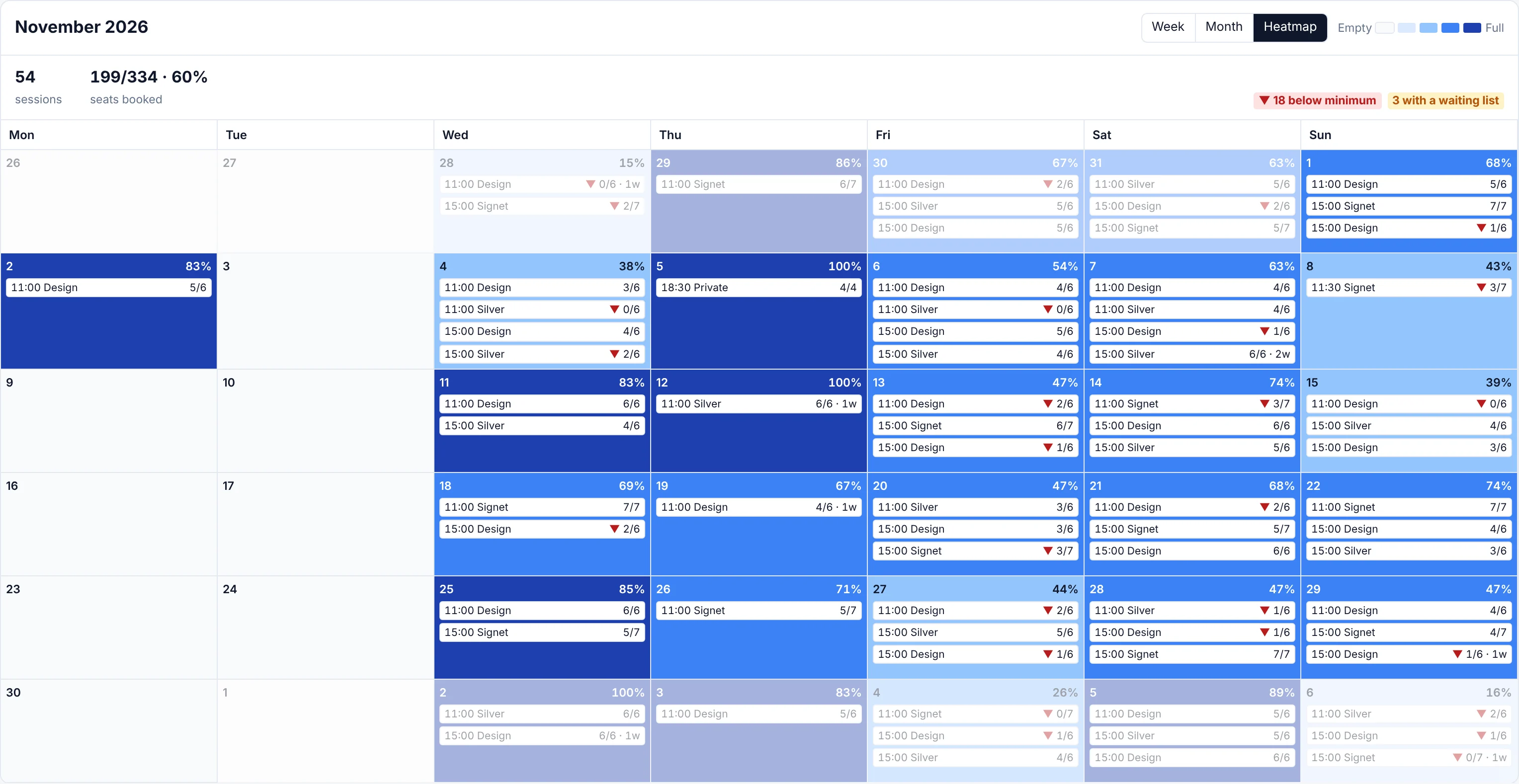
Heatmap calendar type showing a month shaded by fill
📊 Timeline: who's double-booked?
One row per instructor, place, listing or equipment pool, with time running across. Clashes light up in red, so a tutor teaching two classes at once or a room booked twice is impossible to miss. Perfect for rentals and anyone sharing people, rooms or kit.
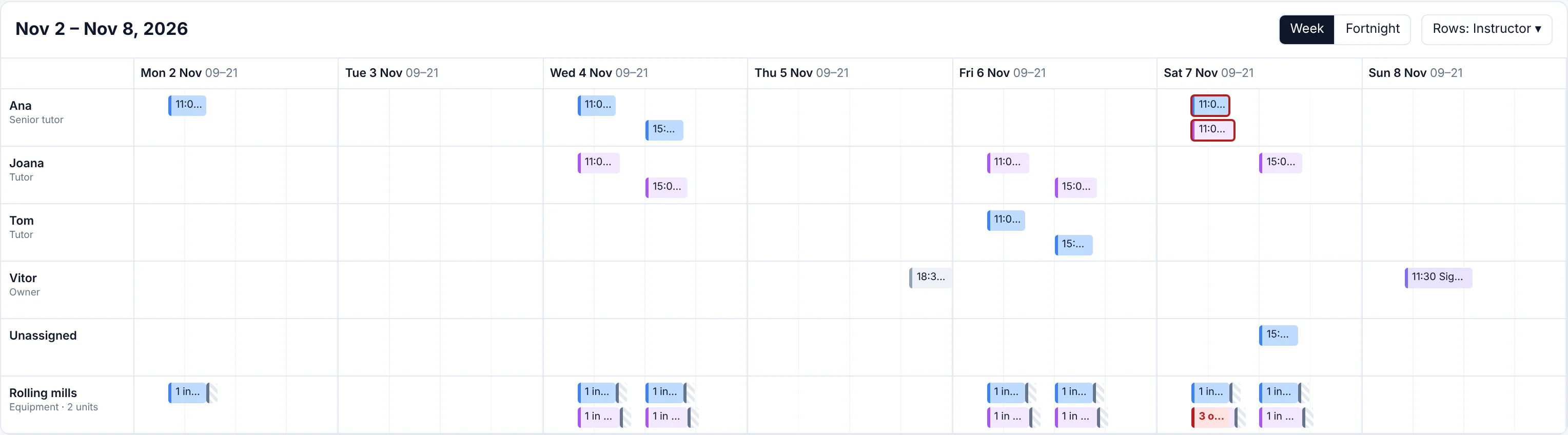
Timeline calendar type with a row per instructor
📋 Table: your run sheet
Every session as a row, grouped by day, with exactly the columns you choose. Take the register right inside the row, export what's on screen to CSV, or print it for the studio wall. Tour operators and busy front desks, this one's for you.
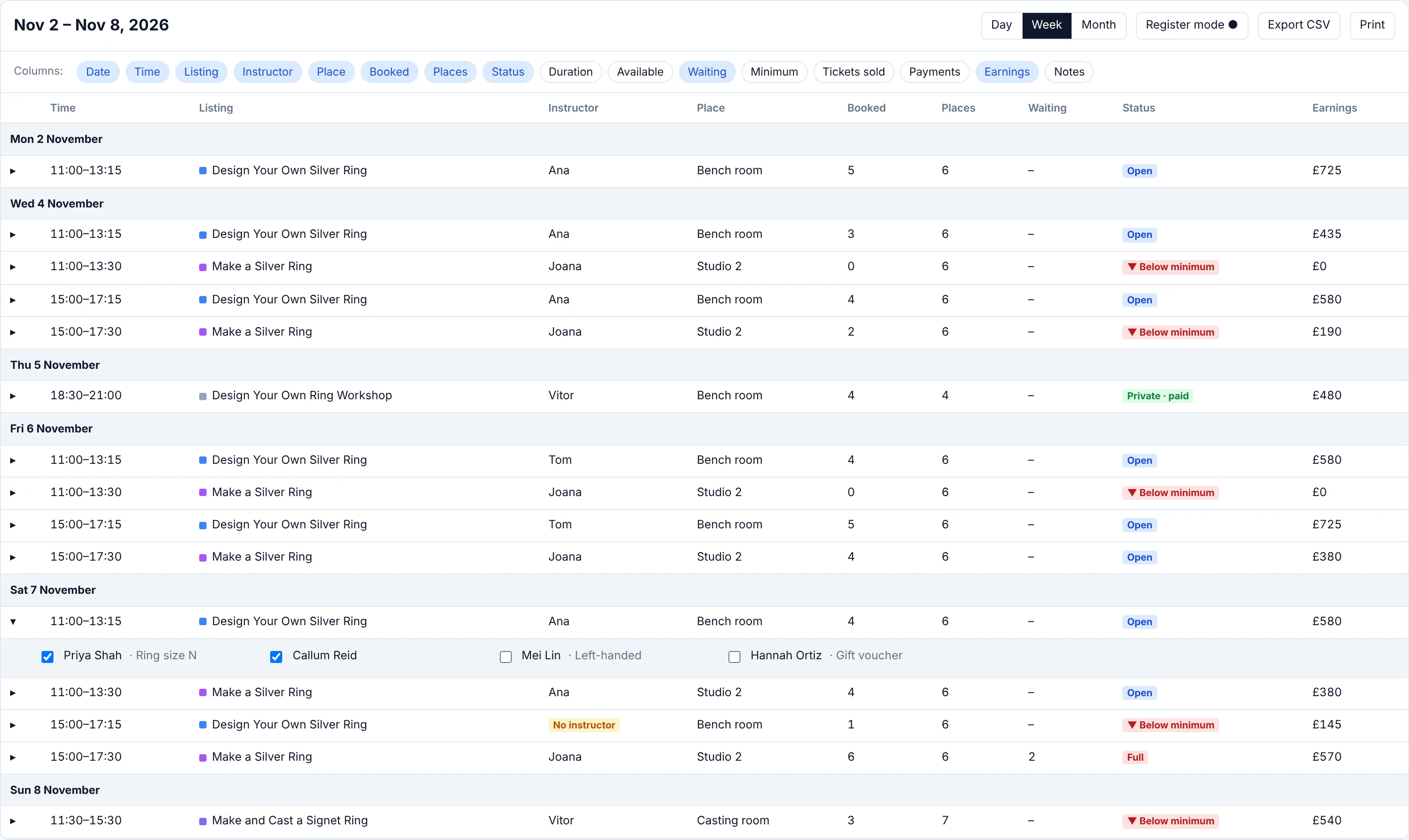
Table calendar type showing a run sheet with chosen columns
👥 Staff roster: who's on?
One row per instructor, one column per day, with hours worked for each. Overlaps show in red, and teaching during time off shows in amber. Instructors with nothing on still appear, so finding cover takes seconds.
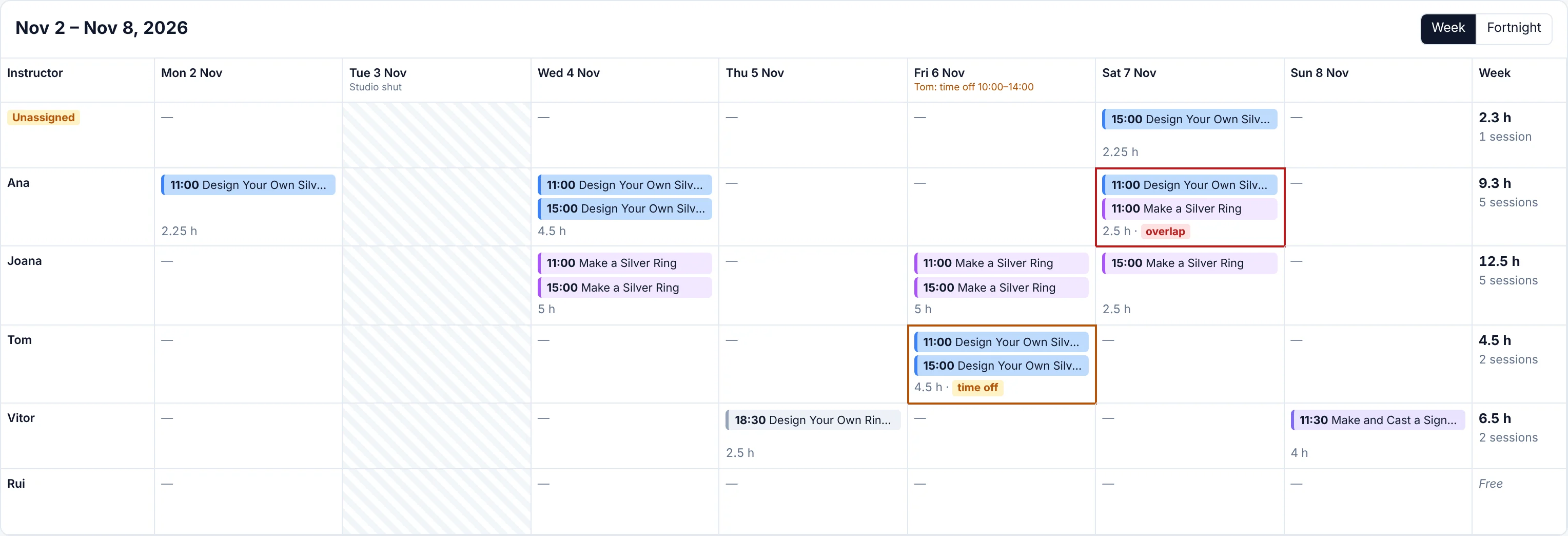
Staff roster calendar type with hours per instructor
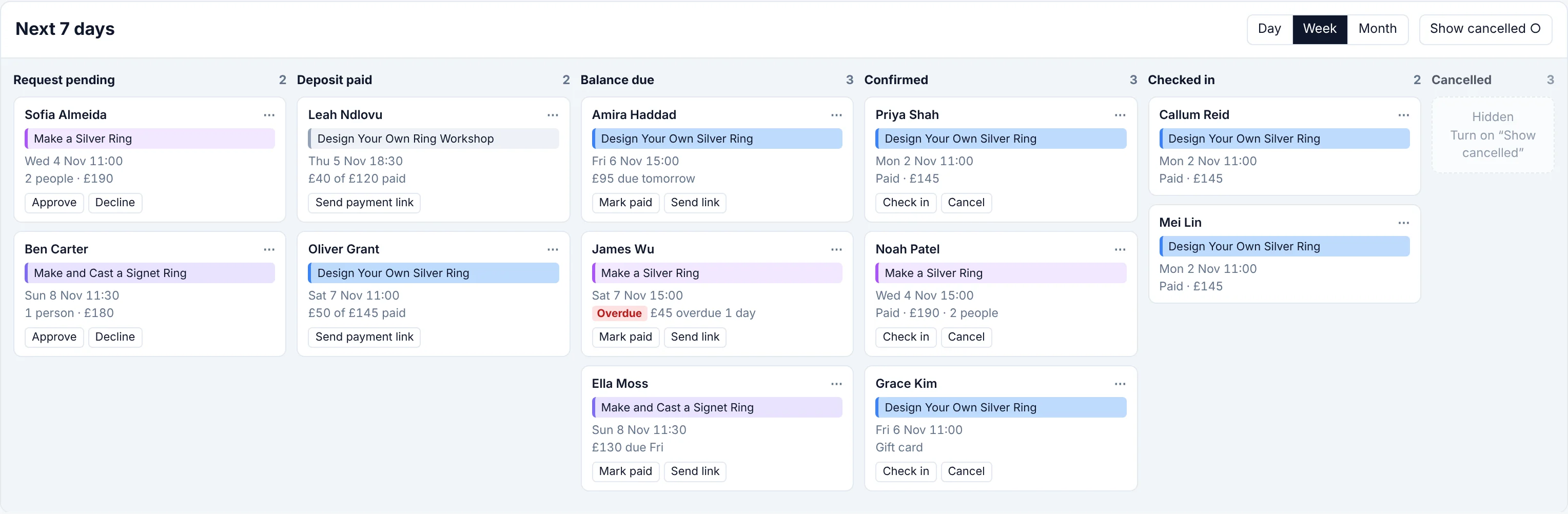
📌 Booking pipeline: where's every booking at?
Every booking as a card, moving from request, to deposit, to balance, to checked in. Chase an overdue balance or approve a request right from the card.
🎓 Term pipeline: how's every term going?
One ribbon per term or course run, grouped by listing. Each dot is a session (filled once it's done, red if it was cancelled), breaks like half term are shaded, and enrolled against places sits right beside it. See in seconds which terms are thriving and which still have room to sell.
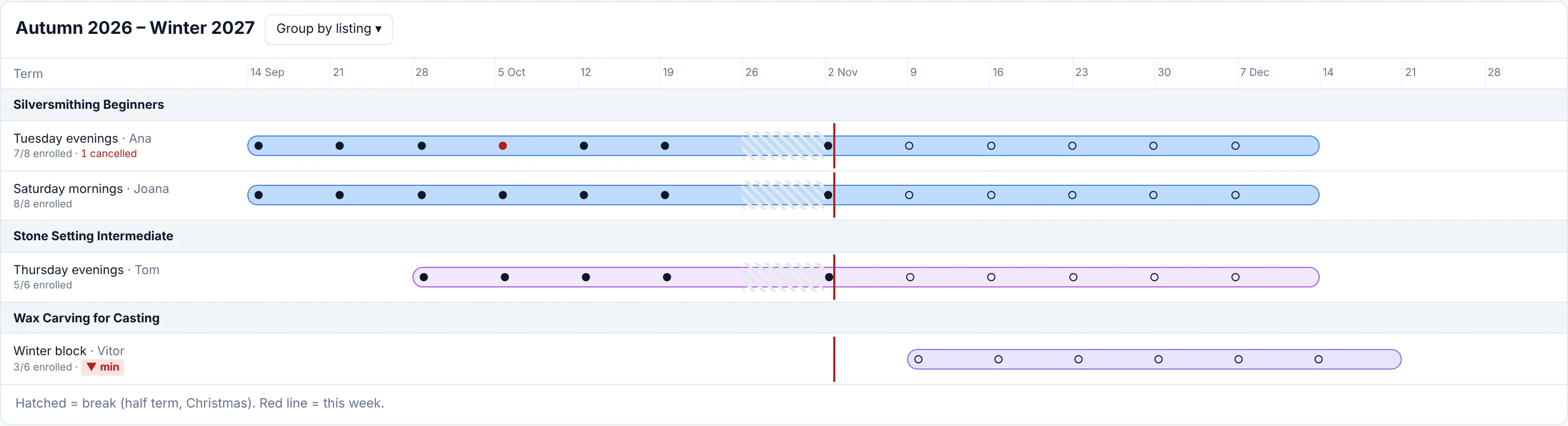
Term pipeline calendar type with one ribbon per term
🔭 Multi-month horizon: see the season coming
Three, six or twelve months on a single screen, every day shaded by how full it is, with closures clearly marked. Spot the busy weeks filling up and the quiet ones you need to promote, months before they arrive.

Multi-month horizon showing six months shaded by fill
✅ Needs attention: your to-do list, written for you
Overbooked sessions, classes below their minimum, missing instructors, booking requests, unpaid balances and full waitlists, all in one list with the most urgent at the top. Every item comes with the button to fix it. Save it as a "Monday check" and start every week knowing nothing's slipping through.
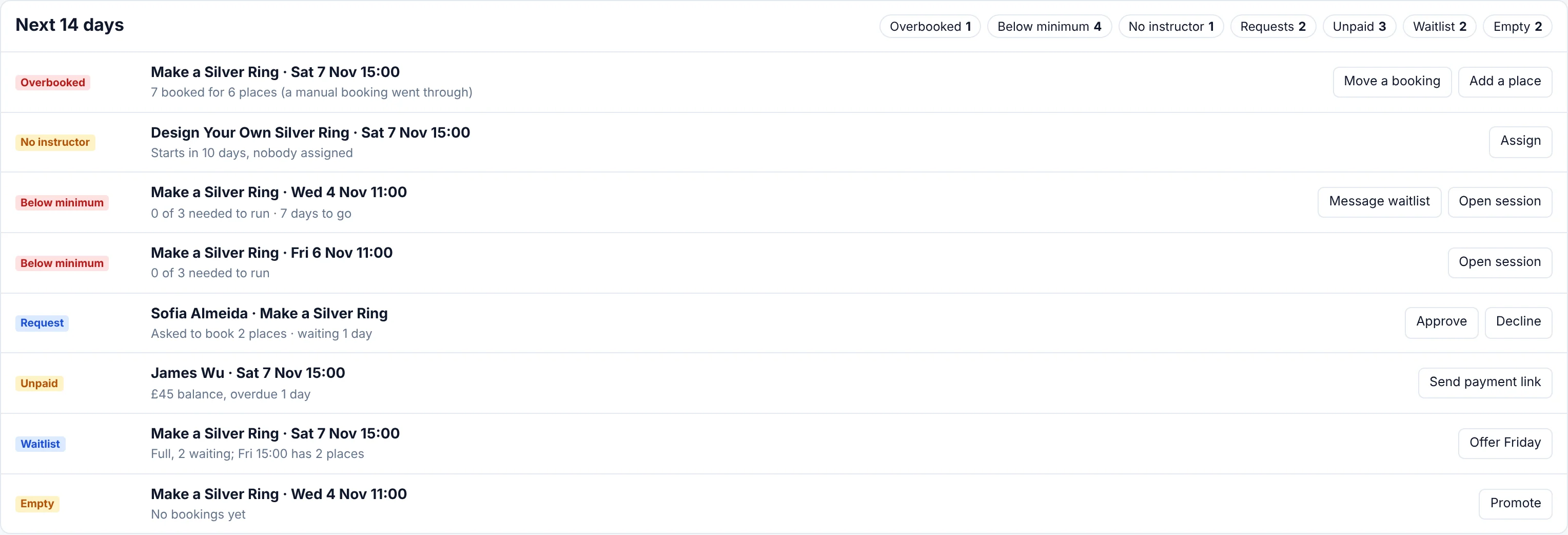
Needs attention list with the action for each item
✨ Day, Week and Month, rebuilt
The classics got a serious upgrade too.
Sessions at their real length. A three-hour workshop now looks three hours long. Overlapping sessions sit side by side, empty hours fold away, and a red line shows you exactly where "now" is.
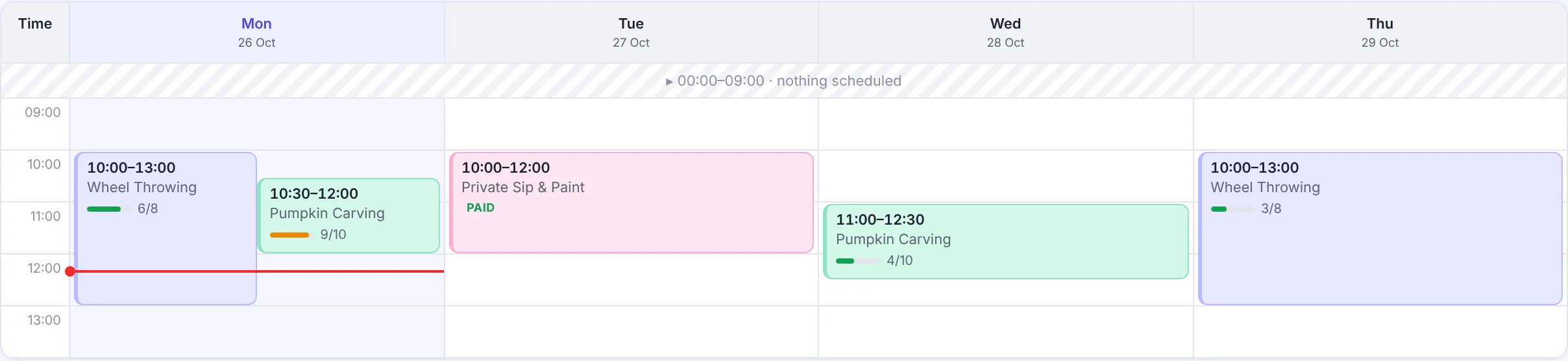
Week view with sessions drawn at their real length
A Month you can actually read. Time, listing and seats for every session, plus how busy each day is, without hovering over a single thing.

Month view with times and fill for each session
Month in your pocket. On your phone, tap any day and it slides up from the bottom. No scrolling, no hunting.
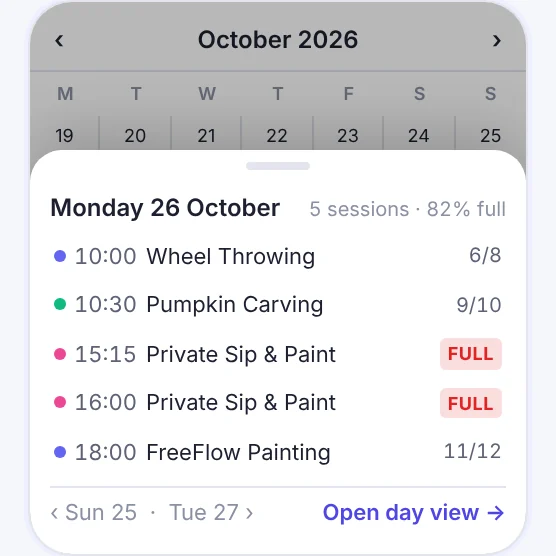
Month view on a phone with a day open in a bottom sheet
Know how your week is going, instantly. A summary strip shows sessions, seats booked and revenue for whatever's on screen, plus chips for anything that needs you: empty sessions, overbooked ones, missing instructors, and full classes with people waiting. Click a chip to see just those. (Revenue is only shown to senior staff.)
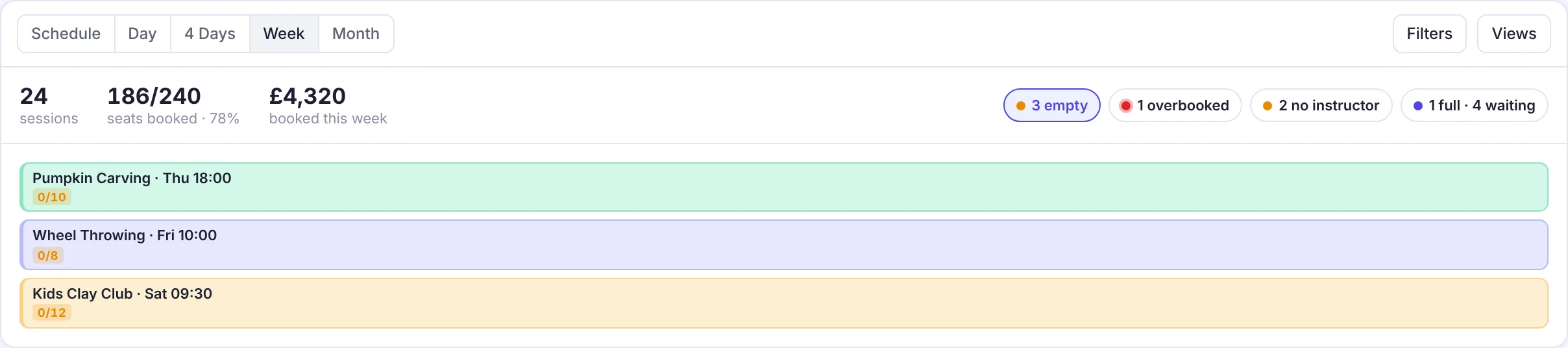
Summary strip with sessions, seats, revenue and attention chips
Colours that mean something. Colour sessions by listing, instructor, location or how full they are. With fill colours on, your quiet sessions jump right out.

Week view coloured by how full each session is
Spot a gap? Fill it. Click any empty slot and a new session opens with the listing, date and time already filled in.
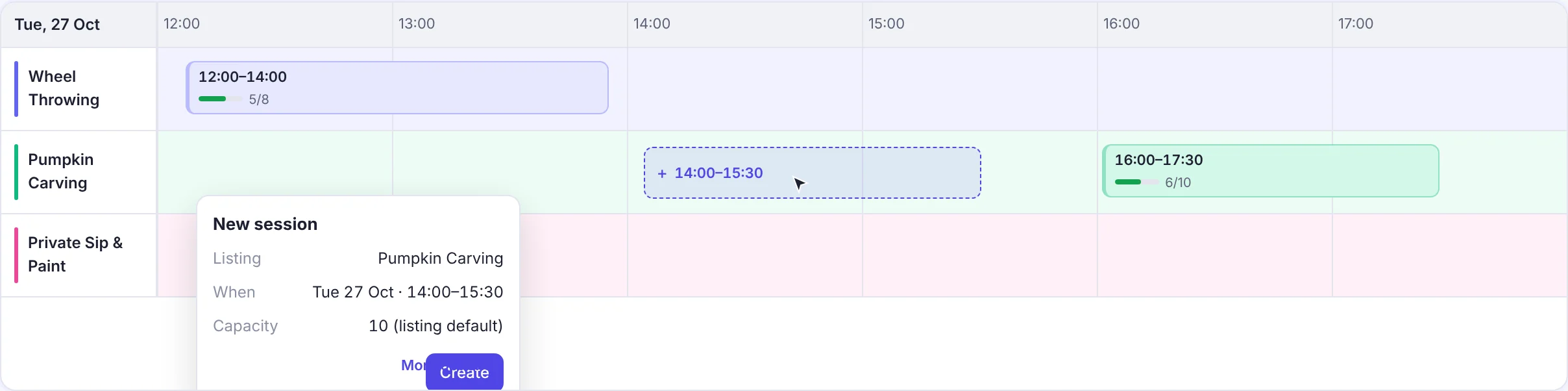
Clicking an empty slot opens a prefilled new session
See clashes before they happen. Group the Day view by instructor or location, and a double-booked person or room stands out straight away.
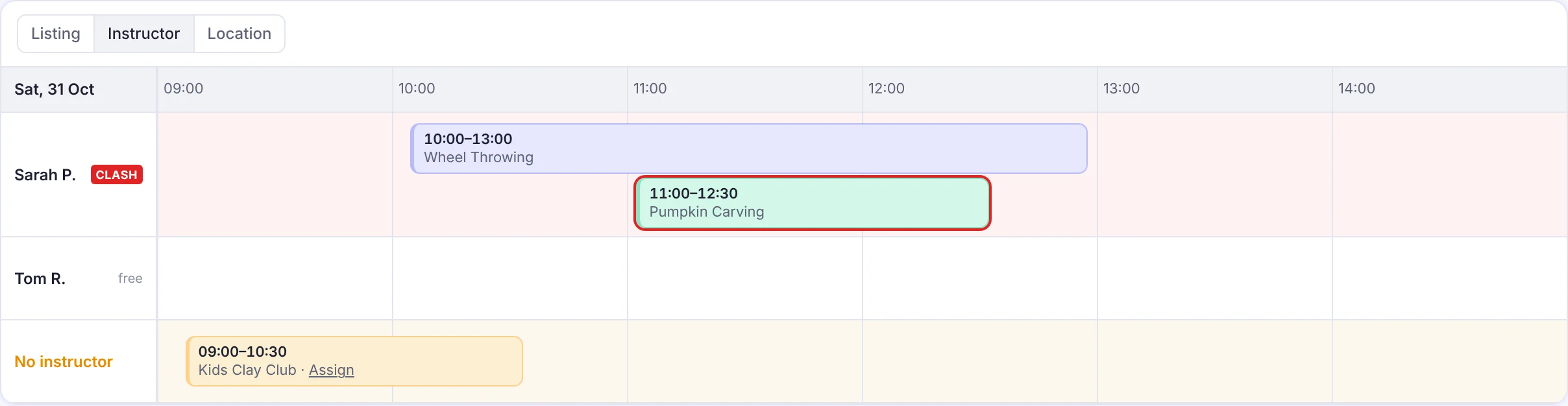
Day timeline grouped by instructor with a clash flagged
Drag and drop to reschedule. Grab a session, drop it at the new time, and choose whether to email everyone booked on it. Changed your mind? You've got a few seconds to undo before any email goes out. (On desktop.)
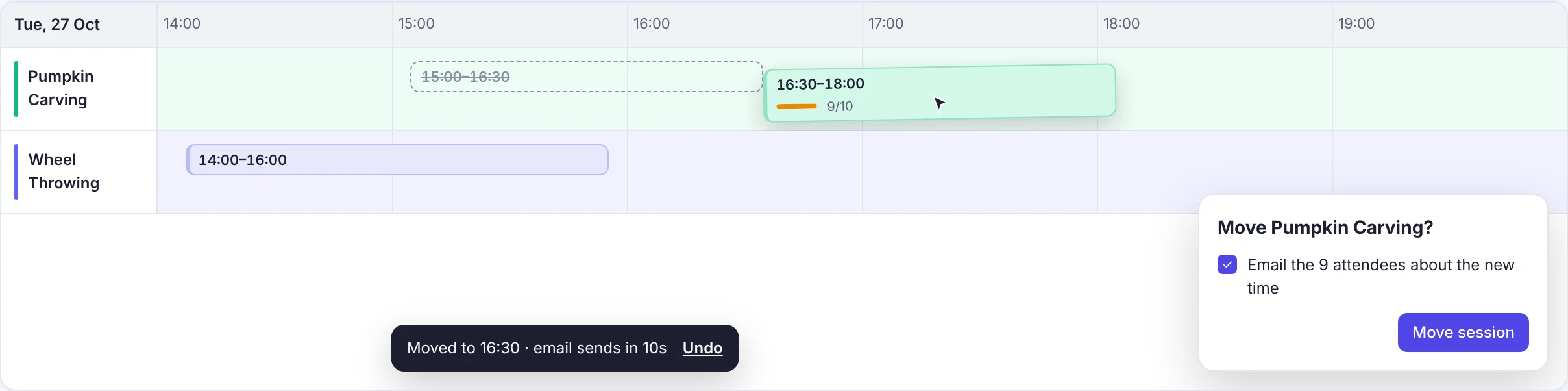
Dragging a session to a new time with a confirm dialog and undo
🤖 Or just ask Daniel
Not in the mood to click? Ask Daniel, your AI assistant, _"is anyone double-booked next week?"_ or _"who's free to cover Saturday?"_ and get the answer in seconds.
---
Build your calendar today
Open your calendar, pick a type, and save your first view. Then tell us what you built. We read every reply, and the best ideas end up in the product.
That's part 1 of 7. Part 2 is coming soon, and trust us, you won't want to miss it. 👀
— Vitor and the Baluu team