Welcome to part 5 of our year-end announcements. Part 4 was about getting paid. This one is about the people who pay you: what you need to know about them, how you ask for it, and what you can do with it once you have it.
Here's something I've learned from years of reading our support inbox: most of our partners' issues are about data. Getting it in, and getting it back out. "How do I ask about allergies?" "Why did my customer have to type that again?" "Where can I see who's actually coming?"
If we got data right, we'd fix most of those issues in one go. Simple, right? Easier said than done.
So we split it into two jobs: putting data in, and reading it back.
Why we changed it
Every business needs to know something different.
For years Baluu was a marketplace, so we decided what to ask: name, email, phone and newsletter consent. Keep it short and more people book.
A booking system is different. A forest school needs to know if a child has an allergy and who's picking them up. A climbing wall needs a signed waiver. A retreat needs to know if you want a lift from the station. It changes from business to business.
Booking questions were our first answer, and they weren't enough.
🔁
You had to set them up again on every listing. 10 classes meant the same questions 10 times, and 10 places to update them.
⌨️
Your customers had to answer them again on every booking. Because questions lived on the listing, we couldn't fill them in from last time, even when the customer was logged in.
How it works
Three layers. Each asked once, in the right place.
So we started again, from who the information is really about.
Customer fields
the person booking and paying
Attendee questions
each person who comes
Booking questions
this one listing
Everything you need to know
Kids' clubsRetreatsClimbing walls
Often the person booking is the person attending, but you still want different things from each. From the customer: can we send them our newsletter? From the attendee: any medical condition we should know about? Saved with the right person, it's there the next time they come, even when someone else books for them.
Year-end 2026 · Part 5 of 8
The changes.
Customer fields: set up once, asked everywhere.
Go to Customers → Data model and open the Customer fields tab. Add the fields your business needs, choose which are required, and switch on Ask at checkout. That's it: your listings ask for them, and the answers are saved on the customer.
Logged-in customers find their details already filled in. They only see what's new or missing. To do the same for customers who aren't logged in, switch on Recognise returning customers in Settings → Basket & Checkout: when someone enters an email you know, we send them a one-time code and fill in their saved details.
One switch, asked everywhere
Turn on Ask at checkout, then choose all listings or only the ones you pick. Mark anything staff must not miss as an alert on the register.
15 field types
Text, numbers, dates, date of birth, dropdowns, checkboxes, phone, address, ratings, links and more.
All listings, or some
Ask a field everywhere, or only on the listings you pick.
Phone is your call
Name and email are always asked. Phone can be required, optional or off.
Attendee questions: know who's coming, not just who paid.
A parent books a holiday club for two children. The parent is your customer; the children are your attendees. You need the parent's phone number, and each child's date of birth, allergies and who can collect them.
On the same Data model page, open the Attendees questions tab and group your questions into sets, such as Kids and Adults. For each set, choose who it asks about.
Who's coming?
Choose whether the buyer comes too, only books for other people (like a parent booking for their kids), or whether you just need a guest count.
Each listing picks its set
On each listing, switch on Ask about each attendee and choose the set it uses. Listings that don't pick one ask your Default questions.
Pick, don't retype
Next time the parent books, they choose which of their children is coming, and the answers are already there.
Follows the person
If someone comes as a guest on another booking, you already know about any medical condition, so your team can help.
Your word for it
Call them attendees, children, students or riders. The name shows on the customer page, at checkout and on the register.
Book now, name them later
Buyers can book before they know who's coming. We email them a link to add each person's details, with a reminder if any are missing.
Everyone they book for, in one place
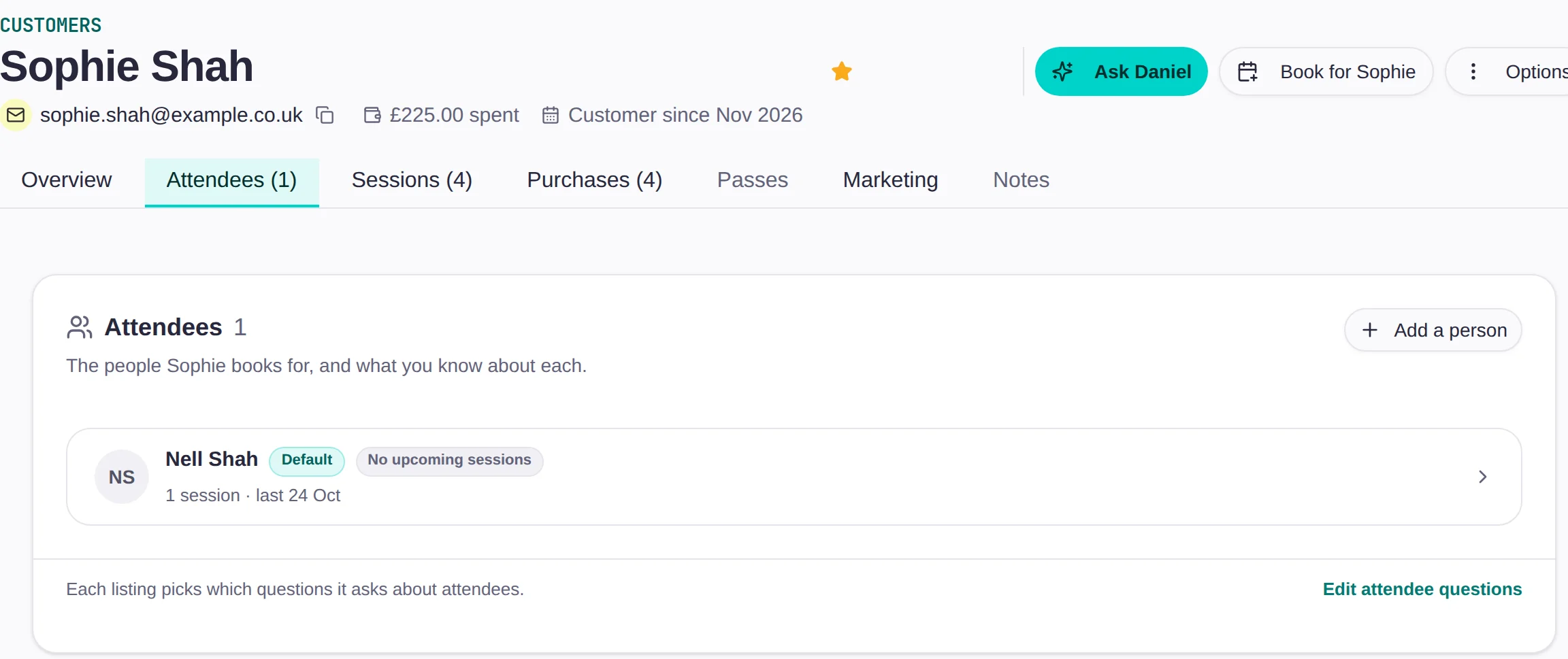
Each customer now has an Attendees tab: the people they book for, and what you know about each.
Booking questions: for what only this listing needs.
Booking questions stay, for the things that really belong to one listing. You already know who your retreat guest is and that they're vegetarian. What you don't know yet is whether they need a lift from the station.
Find them on each listing under Booking Questions & Attendees. The same section shows which customer fields that listing asks too, so you can see the whole form in one place.
Ask it your way
Pick a type, write the question and give it a short column name for the register and exports.
Ask every guest
Ask once per booking, or once for every guest on it.
Flag it on the register
Turn an answer into an alert on the register, so the instructor sees it on the day.
Or just tell them
Add a note that informs the customer without asking anything.
The register: everything about who's coming, in three groups.
That's data in. Now for getting it back out, starting with the page you open before every session.
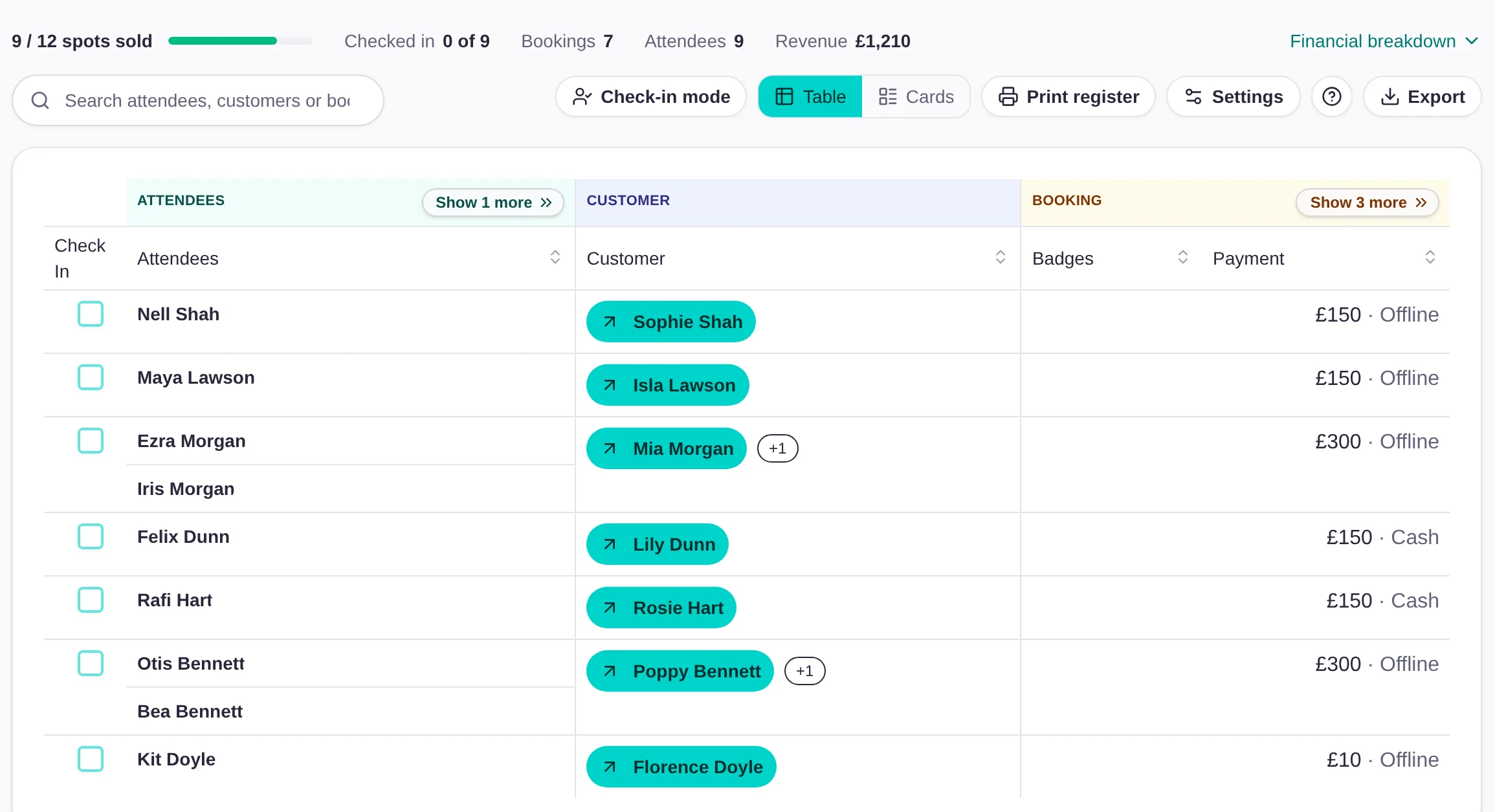
The register now follows the same three layers. Its columns sit in three groups, Attendees, Customer and Booking, and each one folds away when you don't need it. Click a name to open their details and fix an answer right there.
Who's coming, who booked, who's paid
At a kids' club, each child is an attendee and the parent who booked is the customer. Two children on one booking sit side by side, with the payment shown once.
Cards for the door
Switch to Cards for one card per person and a big Check in button.
Set it up once
In Settings → Columns, tick what to show, drag it into order and mark up to two summary fields per group.
Lead with what matters
Put the group you care about first. A front desk might want Booking; a kids' club wants the attendee.
The short version
Pick up to two summary fields per group, such as tickets and add-ons, to keep in view when a group is folded.
Alerts that stand out
Allergies and anything else marked as an alert show as a badge under the person's name.
Share with your team
Owners and managers can share their setup with the whole team in one go.
Alpha
Boards: your numbers, your way.
The register shows you who's coming to one session. Boards will show you how the whole business is doing.
A board is a page of widgets, each showing your data in a different way: how many sessions are running this week, how many bookings came in, how many new customers you've had. You choose what goes on it, so the numbers you check every Monday are all on one page.
Ask your first question once.
Getting data in and getting it back out is where most of your questions to us start, so this is where we've put the work. Set up your customer fields once, add attendee questions if someone else does the booking, and keep booking questions for what's special about a listing. Then open your next register and set it up the way your team works.